

Project Overview
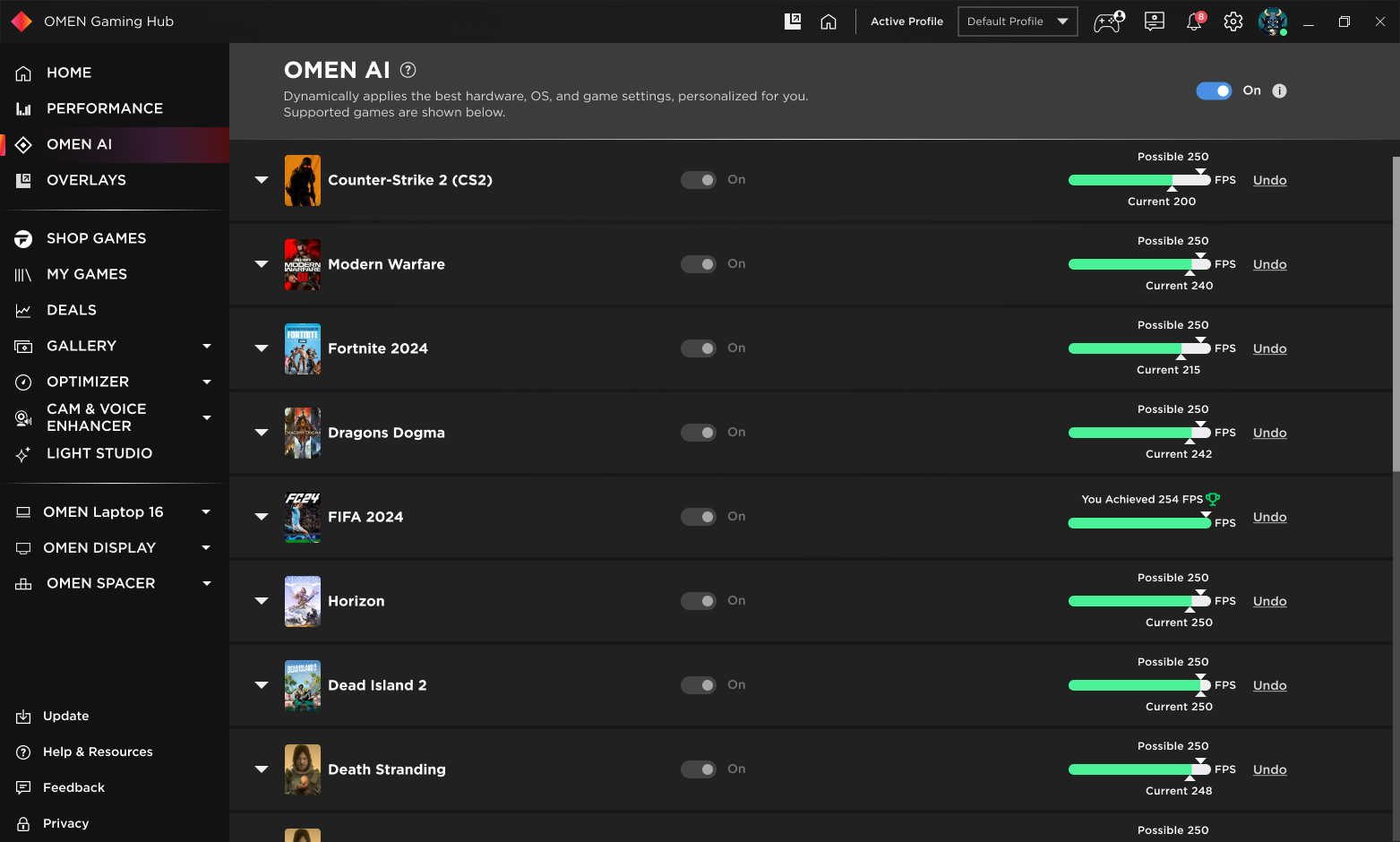
OMEN Gaming Hub has 4.3 million monthly users. OMEN AI is an AI-driven gaming optimizer that dynamically fine-tunes system settings in real-time to maximize FPS, stability, and performance. By eliminating manual tuning, OMEN AI empowers gamers to focus on gameplay instead of complex system tweaks.
Below is a 3-minute walkthrough I recorded to showcase my leadership on UX strategy, user research, and visual design for OMEN AI.
How OMEN AI Works (Product View)
🔹Situation:
OMEN Gaming Hub was preparing to launch an AI-powered performance optimizer, but trust in automation was low. Players weren’t sure what the AI would change, when it would act, or whether they could stay in control.
🔹Task:
Design a UX strategy that makes the AI feel transparent, safe, and genuinely useful—driving activation, sustained usage, and reducing abandonment for both casual gamers and power users.
🔹Action:
- Mapped user fears through interviews and sentiment analysis.
- Designed a dual-mode UX: Smart Mode for one-click automation and Advanced Mode for full control.
- Introduced version history + rollback to address fear of losing control.
- A/B tested tone, defaults, and onboarding flows.
- Added microinteractions and progressive disclosure to keep the experience lightweight.
- Worked closely with PM/engineering to ensure UX behavior matched backend logic.
🔹AI Logic & UX Transparency
To build trust, the feature relied on explainable inputs:
- System signals (CPU/GPU load, thermals, memory, FPS)
- Game context (title, genre, user preference for performance/quality)
- OMEN profiles that ensure safe, high-impact optimizations
Instead of exposing overwhelming technical data, the UX focused on:
- Selecting only meaningful changes per session
- Applying them quietly when safe
- Clearly surfacing what changed and why, so players feel informed—not surprised
🔹Result:
🔥 +30% AI adoption rate in 3 months
📉 50% drop in feature abandonment
🎮 700K+ activations during initial rollout
💬 Major positive sentiment shift around automation and trust
📊 A scalable UX framework for future AI features
🎯 Key Features:
- Auto-Optimization: AI dynamically adjusts CPU, GPU, and memory allocation.
- User Customization Modes: Toggle between AI-driven optimization and manual settings.
- Real-Time Performance Feedback: Provides visibility into AI-driven optimizations, improving trust.
💬 User Quote:
“I don’t know what AI is changing. I need control over my settings, but I also don’t want to tweak everything manually.”
👤 My Role & Responsibilities
As the Senior Product Designer, I led:
- UX/UI Strategy – Defined and crafted intuitive workflows for AI-powered optimizations.
- User Research – Conducted interviews with 50+ gamers to uncover trust issues and pain points.
- Wireframing & Prototyping – Designed and iterated UI solutions based on usability insights.
- A/B Testing & Iterations – Validated multiple design approaches to improve adoption.
- Collaboration & Execution – Worked cross-functionally with PMs, engineers, and stakeholders.

🎮 The Gamer’s Struggle: Balancing Performance & Control
🤔 The Problem
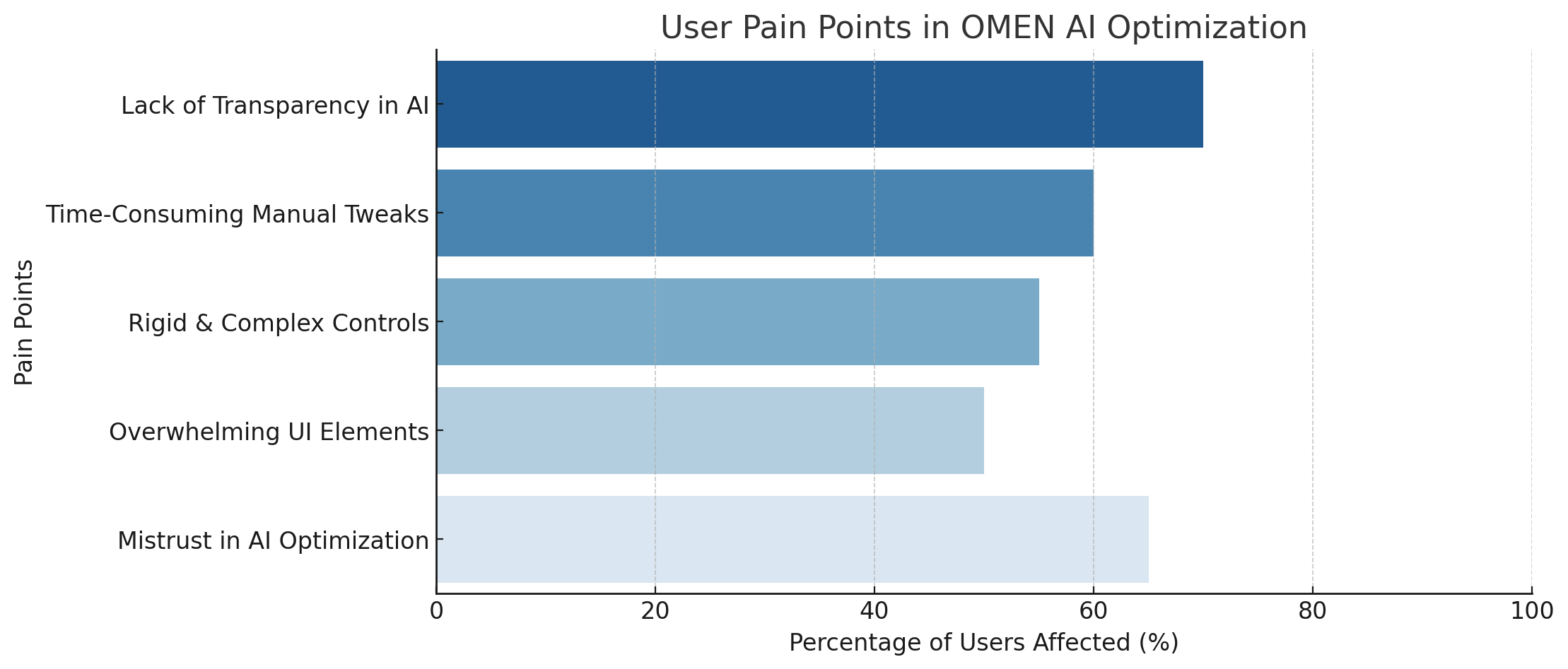
- ❌ Lack of AI Transparency: Users were unaware of what settings AI changed.
- ❌ Time-Consuming Manual Adjustments: Gamers spent hours tweaking settings.
- ❌ Rigid & Complex Controls: No middle ground between automation and manual tuning.
💬 User Quote:
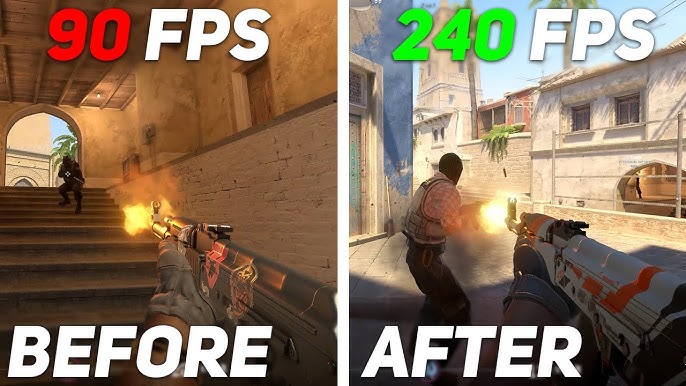
“I checked Reddit and YouTube for hours to find the best settings. I wish AI just did it for me—without ruining my FPS.”
🔹 Experimentation & Metrics for AI Adoption

From the beginning, we defined success for OMEN AI as sustained usage, not just one-time activation.
Our core hypotheses
- If players can see what the AI is doing, they will be more likely to keep it on.
- If players have fast, reliable control (on/off + revert), they will be more willing to try the AI in the first place.
- Clear, in-context messaging about “why this is good for you” will increase adoption.
What we measured
- Activation rate – how many eligible users turned OMEN AI on at least once.
- Turn-off rate – how many users disabled OMEN AI after trying it?
- Sustained usage – how many sessions were played with OMEN AI enabled over time?
We iterated on
- The AI entry points (where and how we invite players to try it).
- The copy and visual language around “AI optimization”.
- The design of the change summary and AI state indicator.
Through multiple UX rounds and in-product iterations, we:
- Increased AI adoption by ~35%.
- Reduced the turn-off rate to below 10%, which was our internal target for “trusted, sticky usage”.
For me, as a product designer, the key was treating OMEN AI as a living system with hypotheses and experiments, not just a static feature. UX, data, and engineering had to work together to make the AI both powerful and trustworthy.
🔹 AI Risks, Guardrails & Player Trust
Designing OMEN AI required solving a trust-and-risk problem, not just a UI one. Players abandon AI instantly if it feels unpredictable, degrades visual quality, or takes away control, so we mapped key risks such as invisible changes, poor optimizations, loss of agency, and one-time curiosity usage. To counter this, we built explicit UX guardrails: always-visible AI state, a one-tap global toggle, clear change summaries in plain language, manual override and undo options, and safe hardware-aware defaults. These weren’t optional—without them, the feature would feel opaque and risky instead of a reliable performance assistant.

🔍 User Research & Insights
- 📌 70% of gamers preferred AI automation but lacked trust.
- 📌 Feature abandonment was common due to confusion with FPS variations.
- 📌 A Counter-Strike two player was willing to pay $150 for expert performance tuning.
💬 User Quote:
“I love high FPS but hate when AI changes my settings randomly. I need to SEE what it’s doing.”
1. The Explorer (The Committed Casuals) – Lucy

Overview:
Lucy is transitioning from mobile gaming to PC gaming and is looking for enhanced graphics and performance. She wants a more robust gaming experience without spending too much time on setup.
Pain Points:
- Complexity of gaming setup
- Overwhelmed with game options
- Adjusting game habits to a new routine
- Limited gaming time
- Budget-conscious, seeks cost-effective performance solutions
AI Opportunities:
- Automated performance insights to optimize without technical knowledge
- Game recommendations based on her skill level
- Smart settings presets for a seamless experience
2. The Progressive Creator – Casey

Overview:
Casey is a streamer and content creator who plays high-graphic-intensive games. She wants a platform that supports both gaming and creative workflows.
Pain Points:
- Limited support for content creation in gaming platforms
- Overwhelmed by technical configurations
- Difficulty balancing performance for gaming and streaming
- Needs stability and reliability for content production
AI Opportunities:
- AI-driven performance balance between streaming and gaming
- AI-assisted content creation tools (video highlights, fan-art capture)
- AI system personalization for workflow efficiency
3. The Competitor – Jorden

Overview:
Jorden is a competitive gamer who plays FPS and esports games like Counter-Strike 2, Call of Duty, and Fortnite. His priority is performance optimization for maximum FPS.
Pain Points:
- Struggles to find the optimal settings for peak performance
- Time-consuming to overclock and fine-tune CPU/GPU
- Needs real-time performance insights to adjust mid-game
- Frustrated with latency and system limitations
AI Opportunities:
- AI-powered performance dashboard for real-time adjustments
- Smart overclocking suggestions for peak FPS
- Competitive analytics to track strengths and weaknesses
🛠️ Design Process: From Confusion to Clarity
1️⃣ Competitive Benchmarking
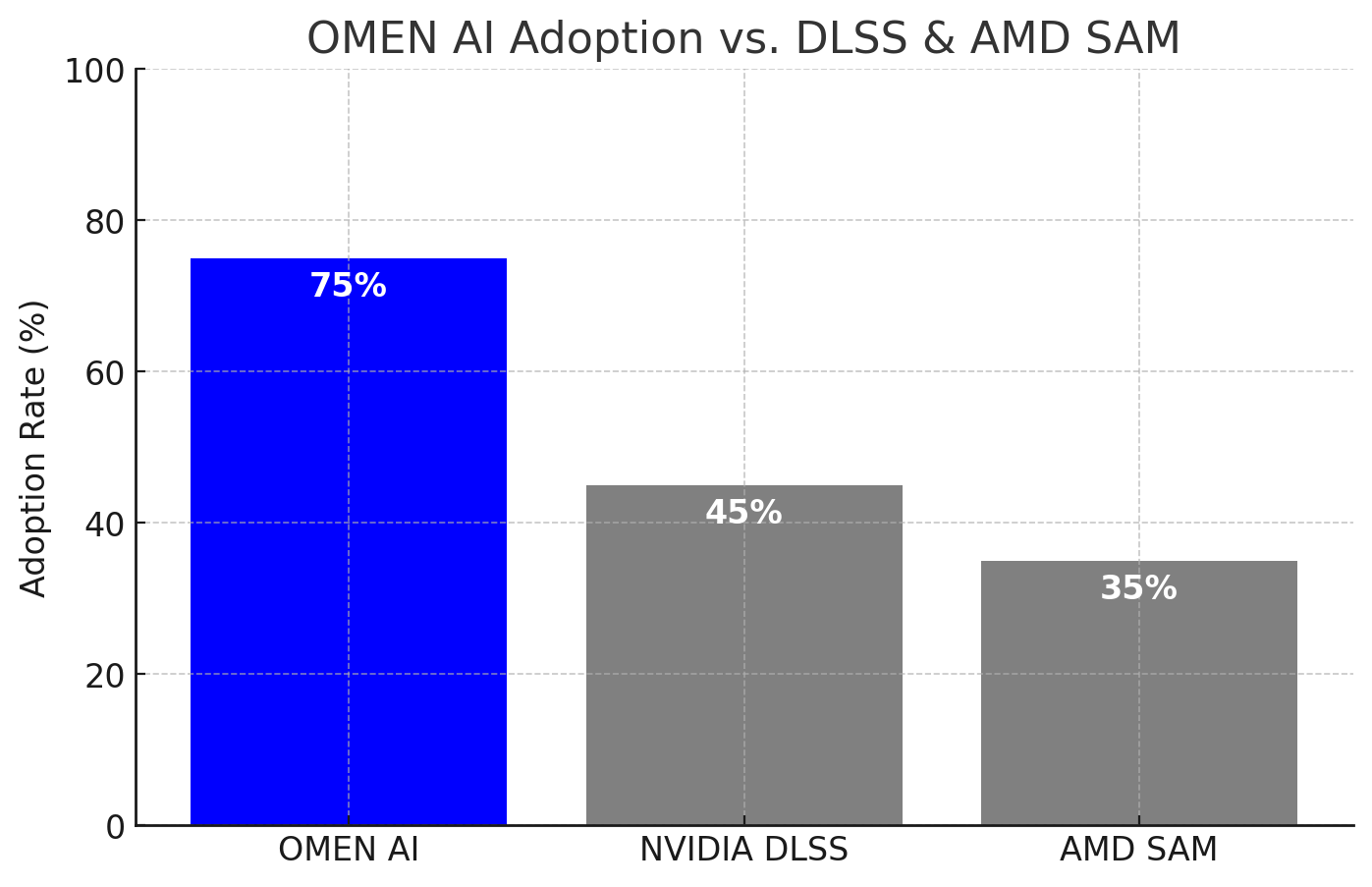
We analyzed AI-powered optimizations from NVIDIA DLSS, AMD Smart Access Memory, and Intel AI Boost.

2️⃣ Wireframing & Prototyping
- 📌 Low-Fidelity Wireframes: Tested interaction flows for AI toggle and insights panel.
- 📌 High-Fidelity Prototypes: Created interactive AI settings dashboards.
Improving Trust in AI-Powered Game Optimization: A UX Research-Driven Approach
- Designing for Trust: Enhancing AI-Powered Game Optimization in OMEN AI. Gamers love performance optimization but don’t always trust AI to make the right choices. I’ll explain how we used UX research to improve transparency and control in AI-driven FPS optimization in this case study.
- Early usability tests revealed a significant challenge: Gamers found FPS optimization confusing and lacked trust in AI adjustments. They weren’t sure what AI was changing, why specific settings were recommended, and how to revert changes. User said: “I don’t know what AI is changing.”

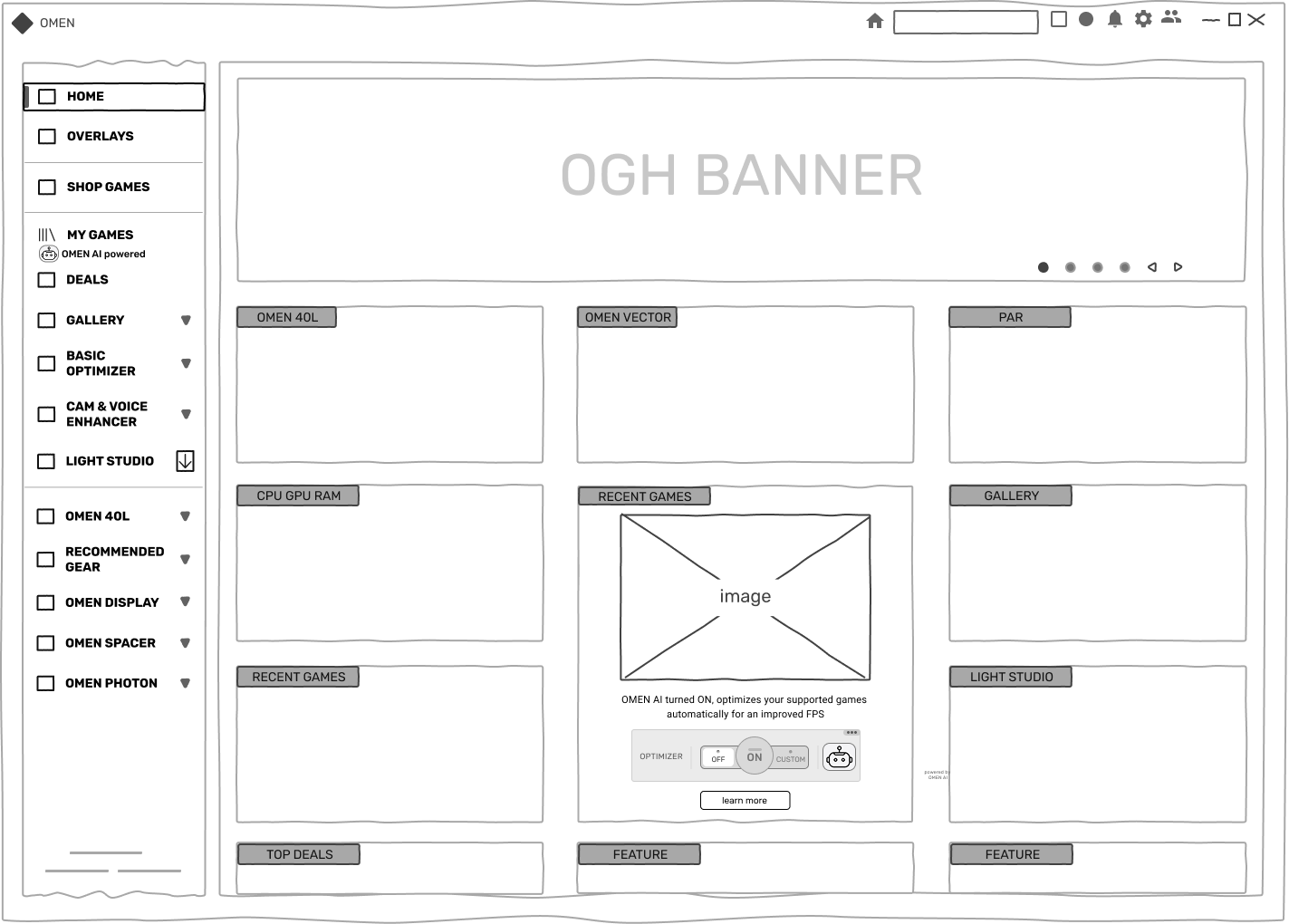
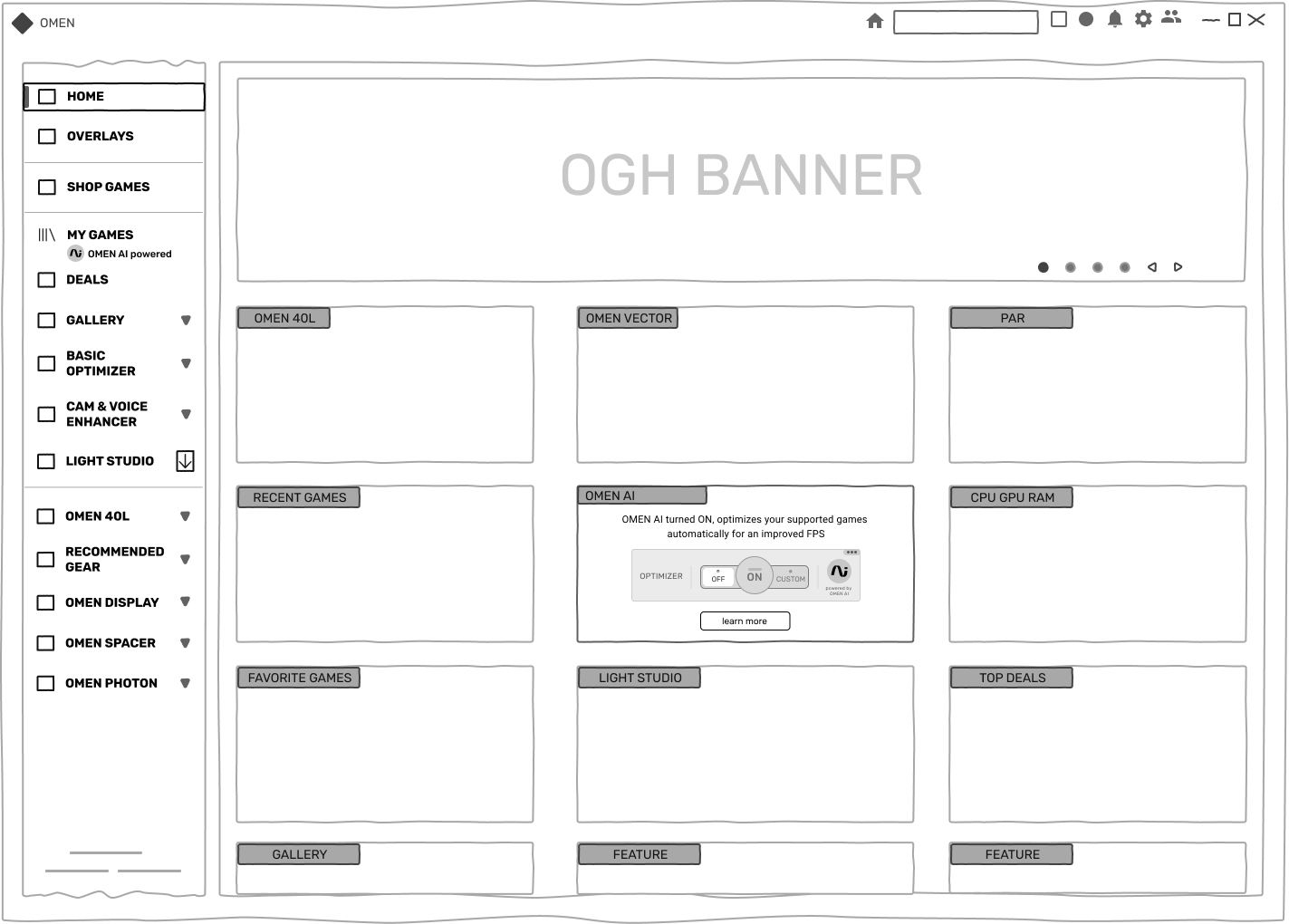
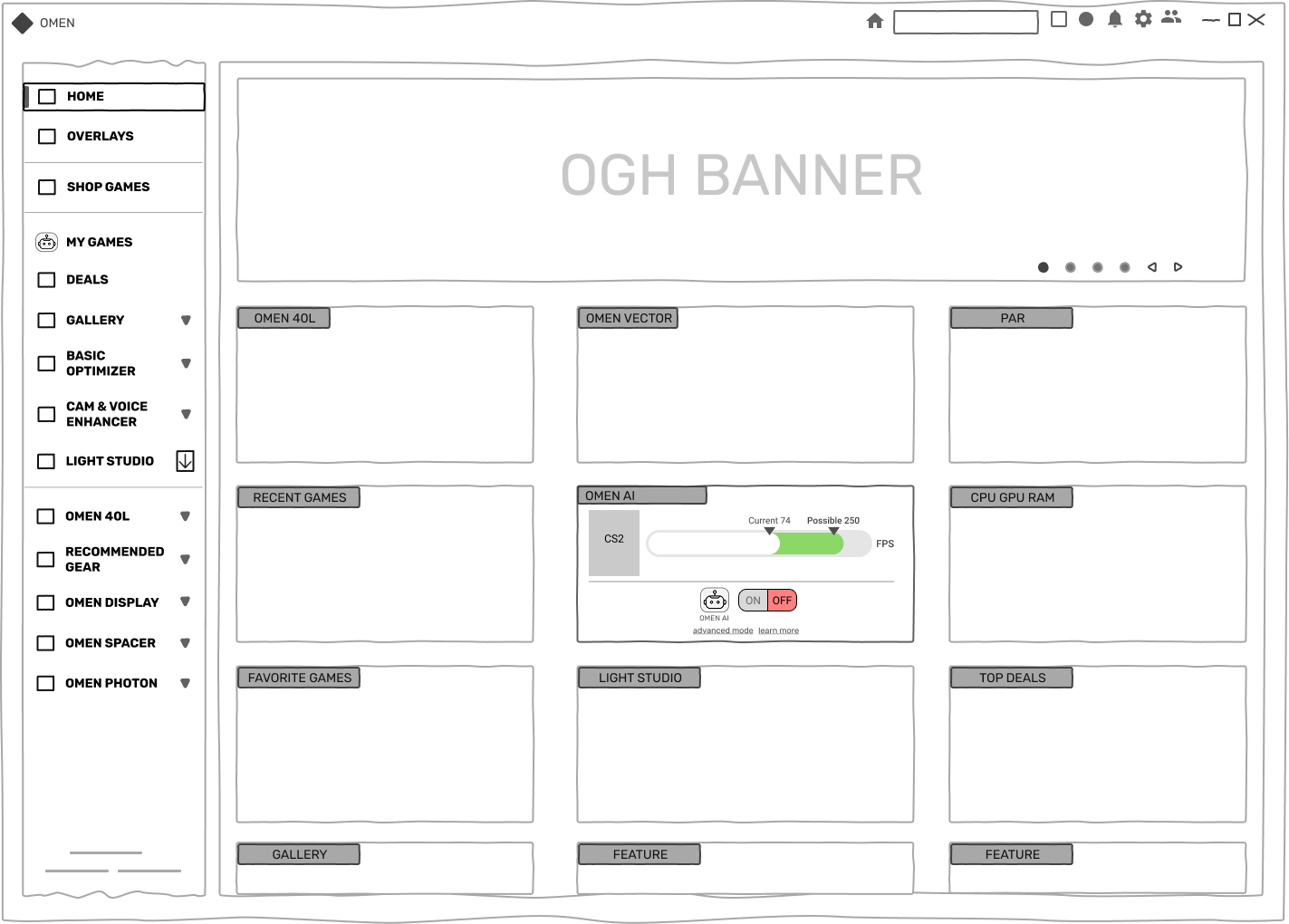
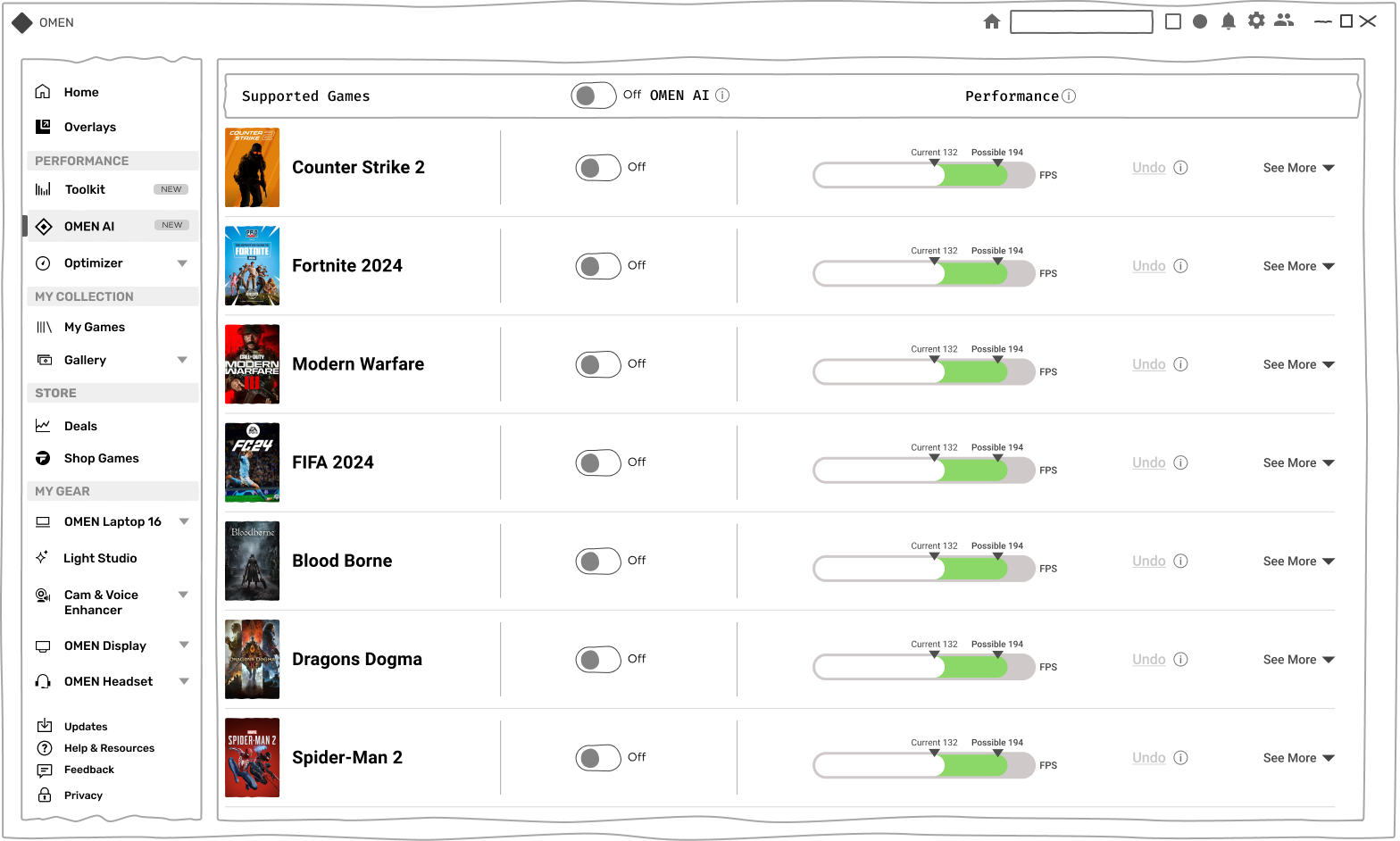
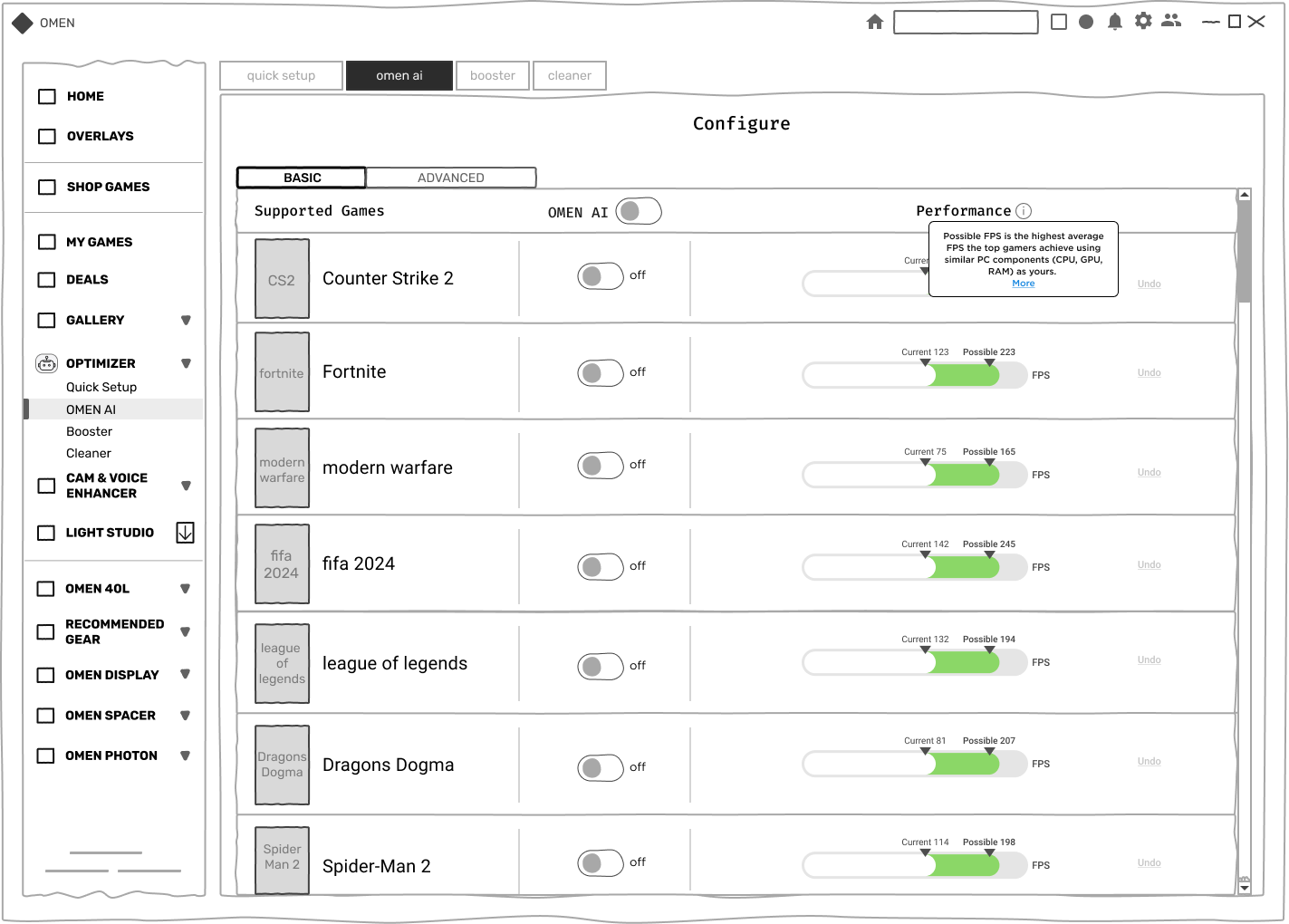
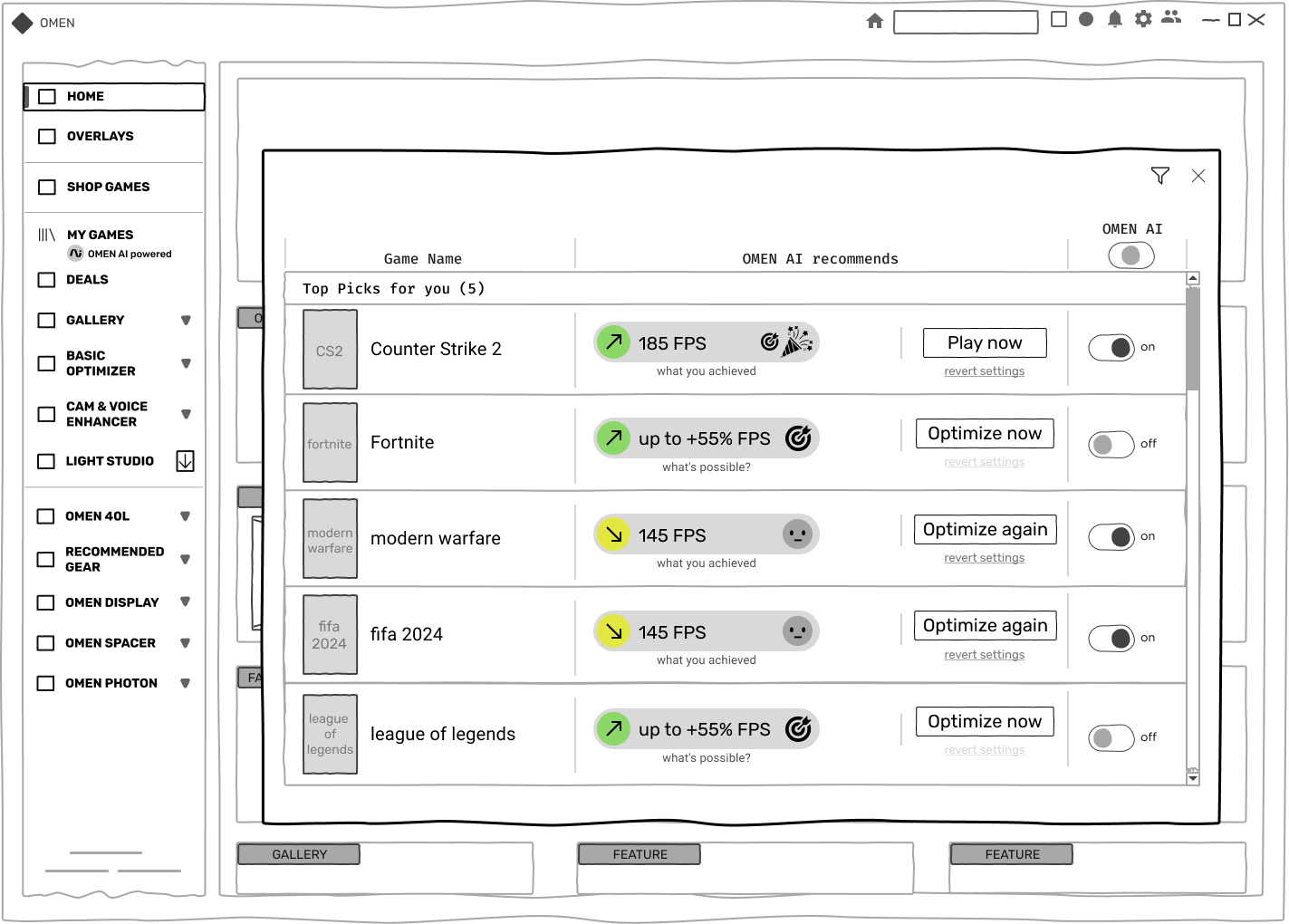
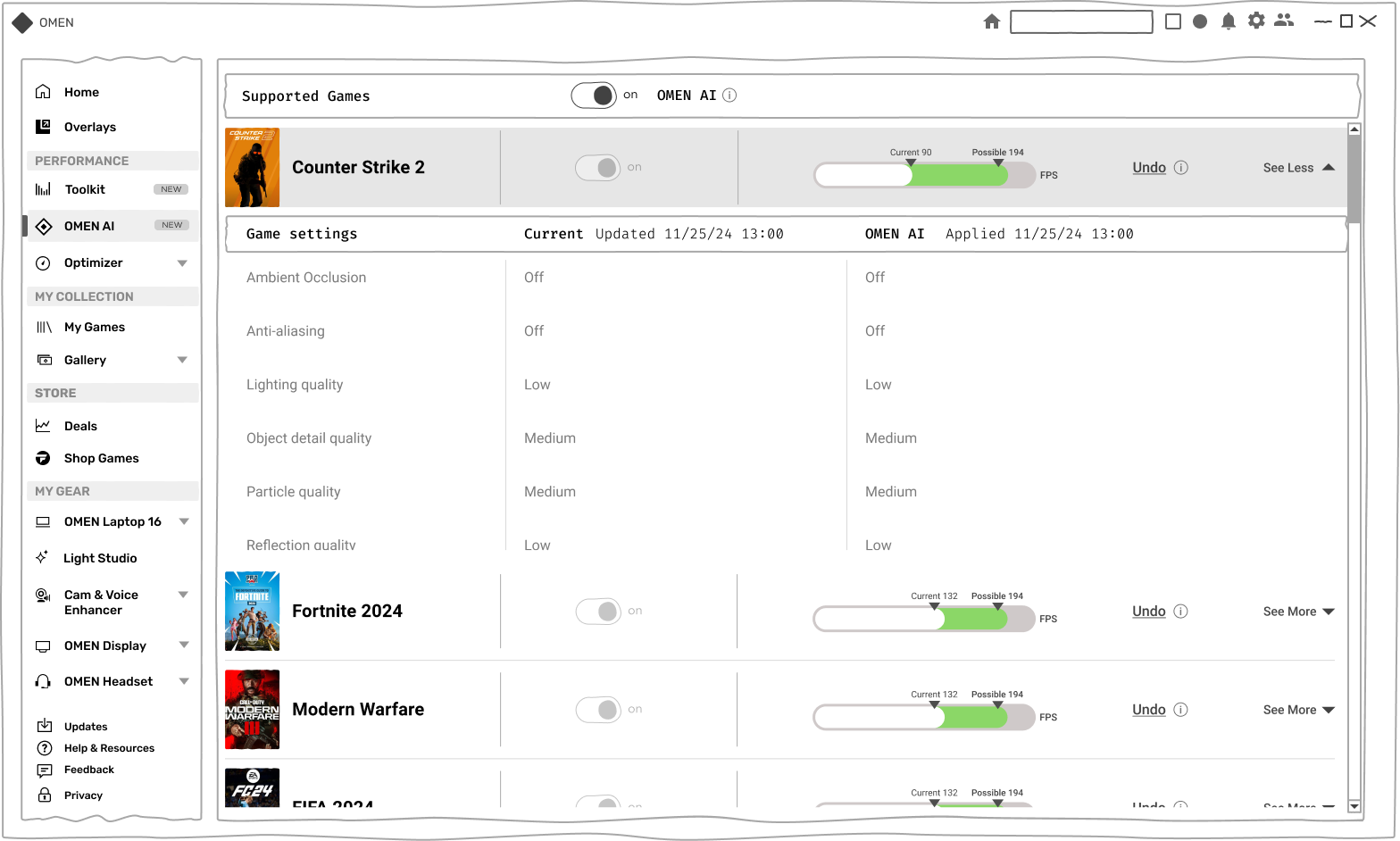
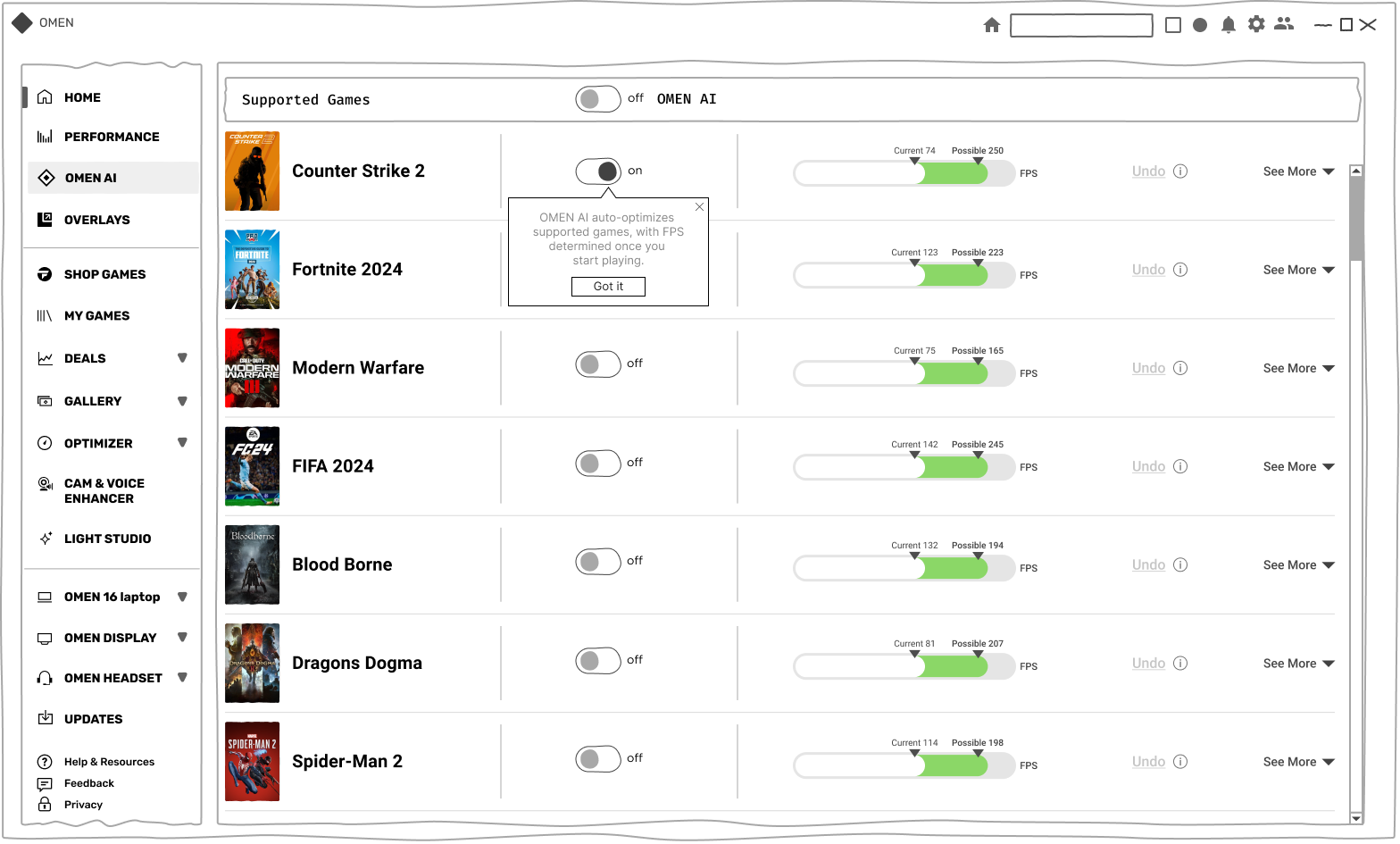
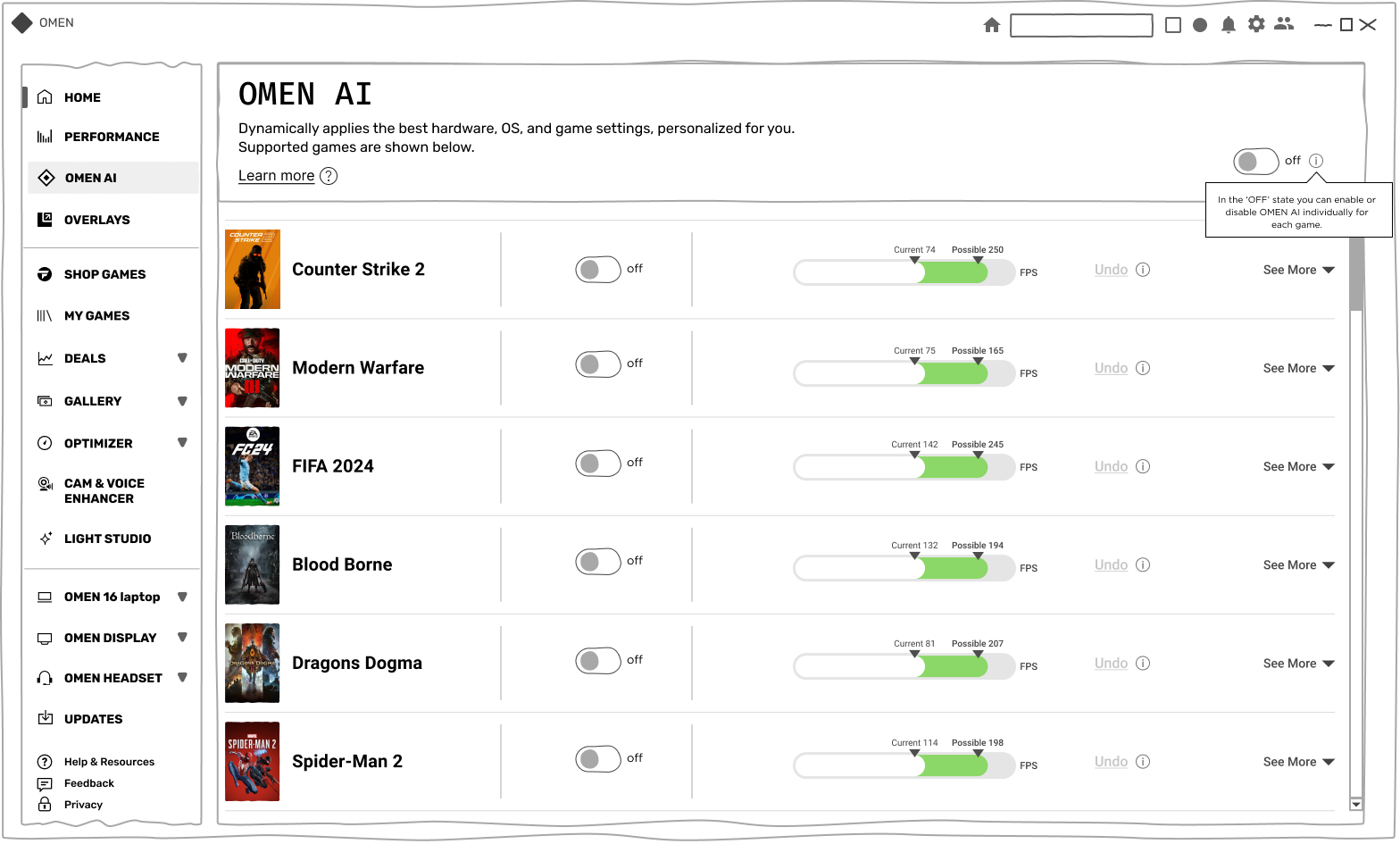
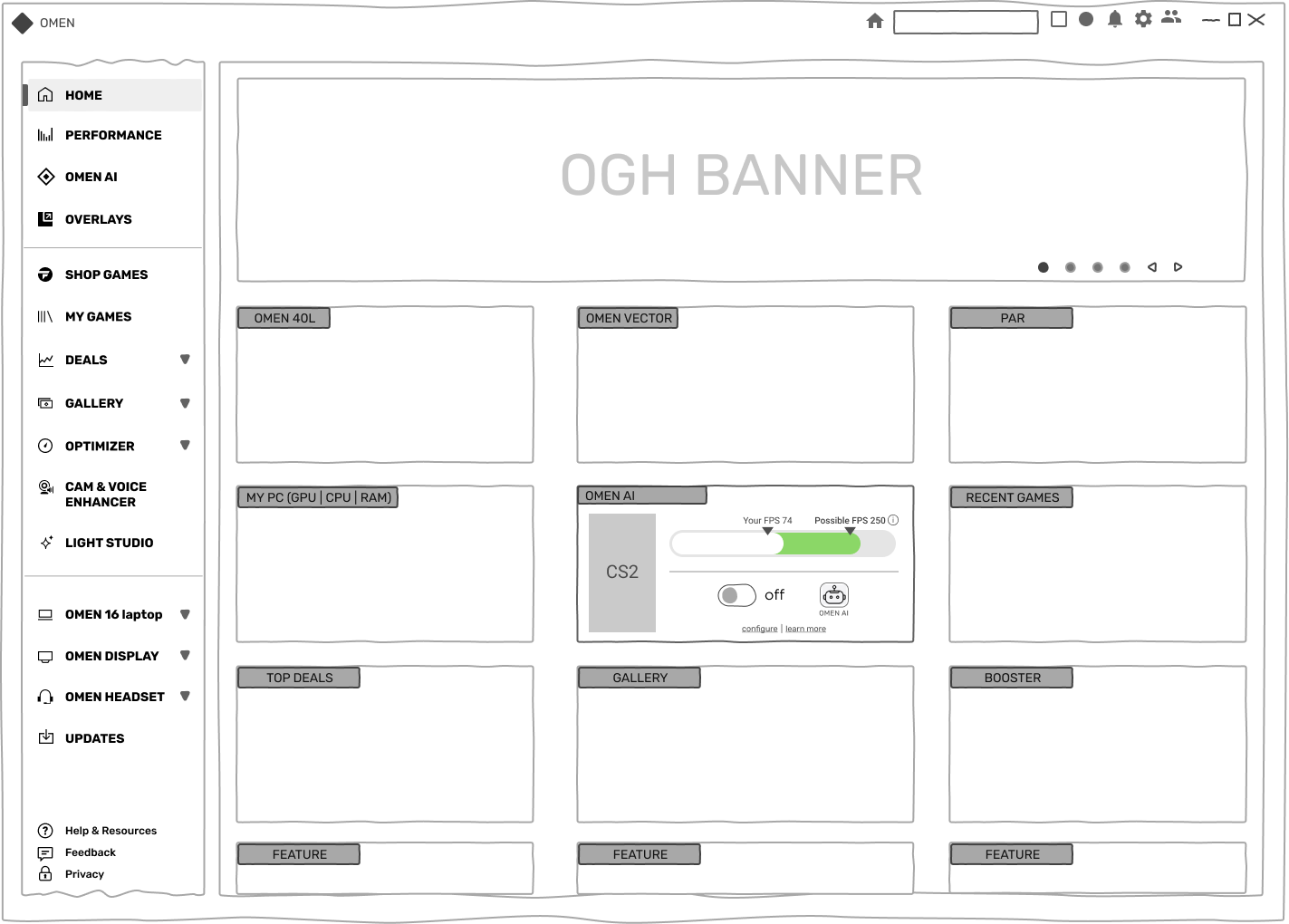
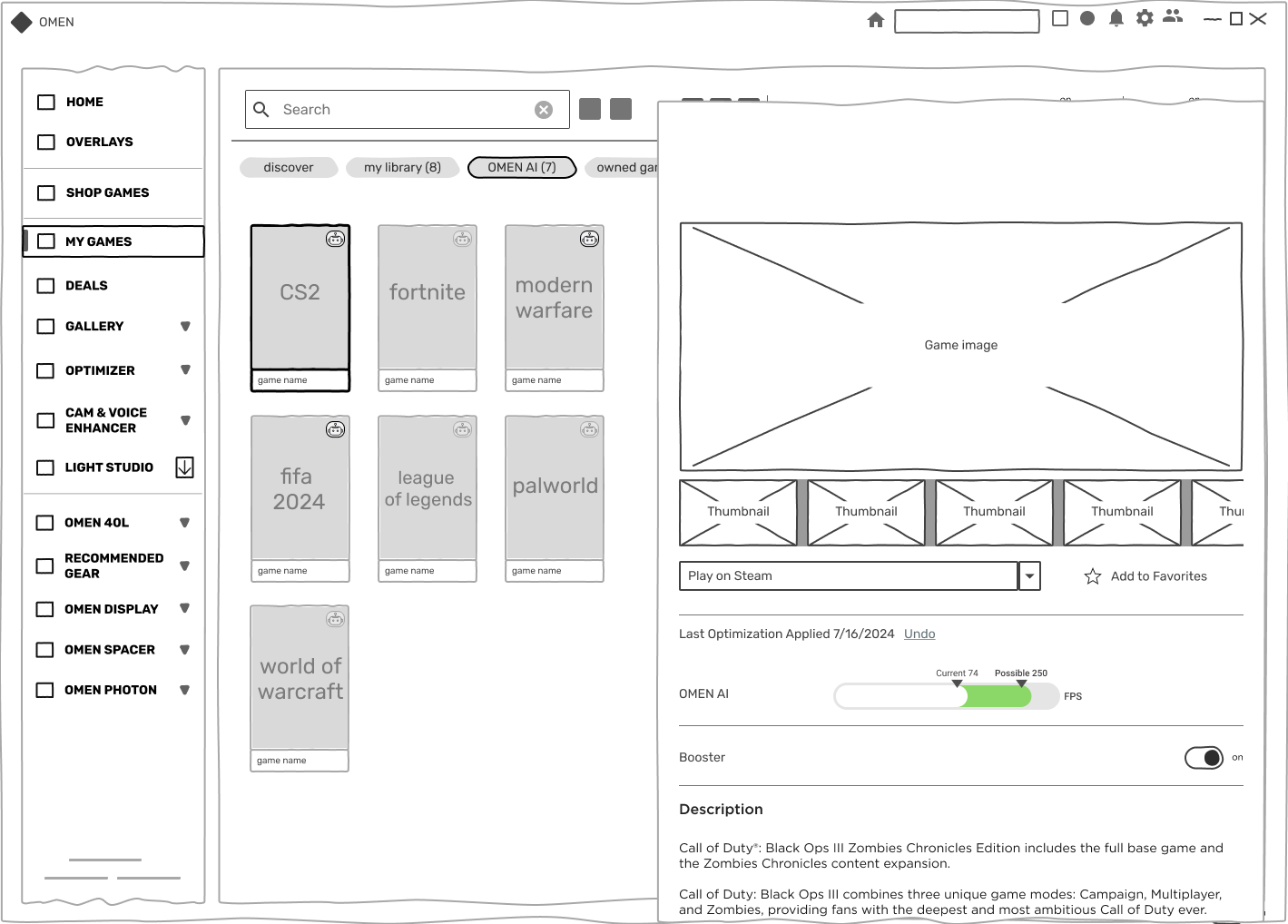
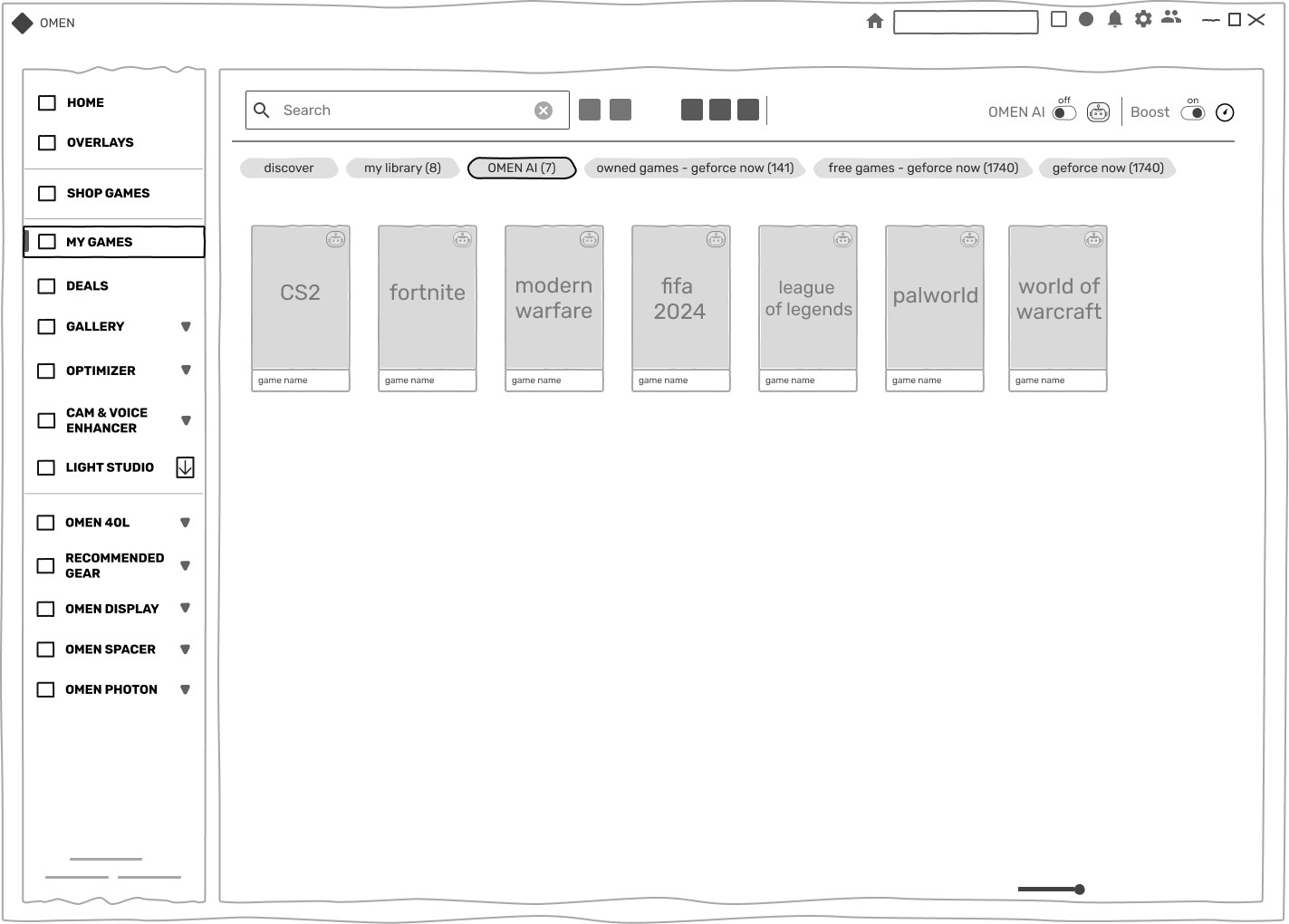
- Designed low-fidelity wireframes to validate the flow between the AI dashboard and manual control pages.
- Developed high-fidelity prototypes in Figma to test usability, animations, and interaction clarity.
3️⃣ A/B Testing & Usability Refinements
- 📈 35% reduction in setup time – Faster optimizations.
- 📈 20% increase in AI feature adoption – Higher trust in AI settings.
- 📈 80% of users preferred real-time insights.
We tested Design A (Tooltips-based UI) vs. Design B (Consolidated Settings Page)
💬 User Quote:
“Seeing the FPS impact right away made me trust the AI more!”
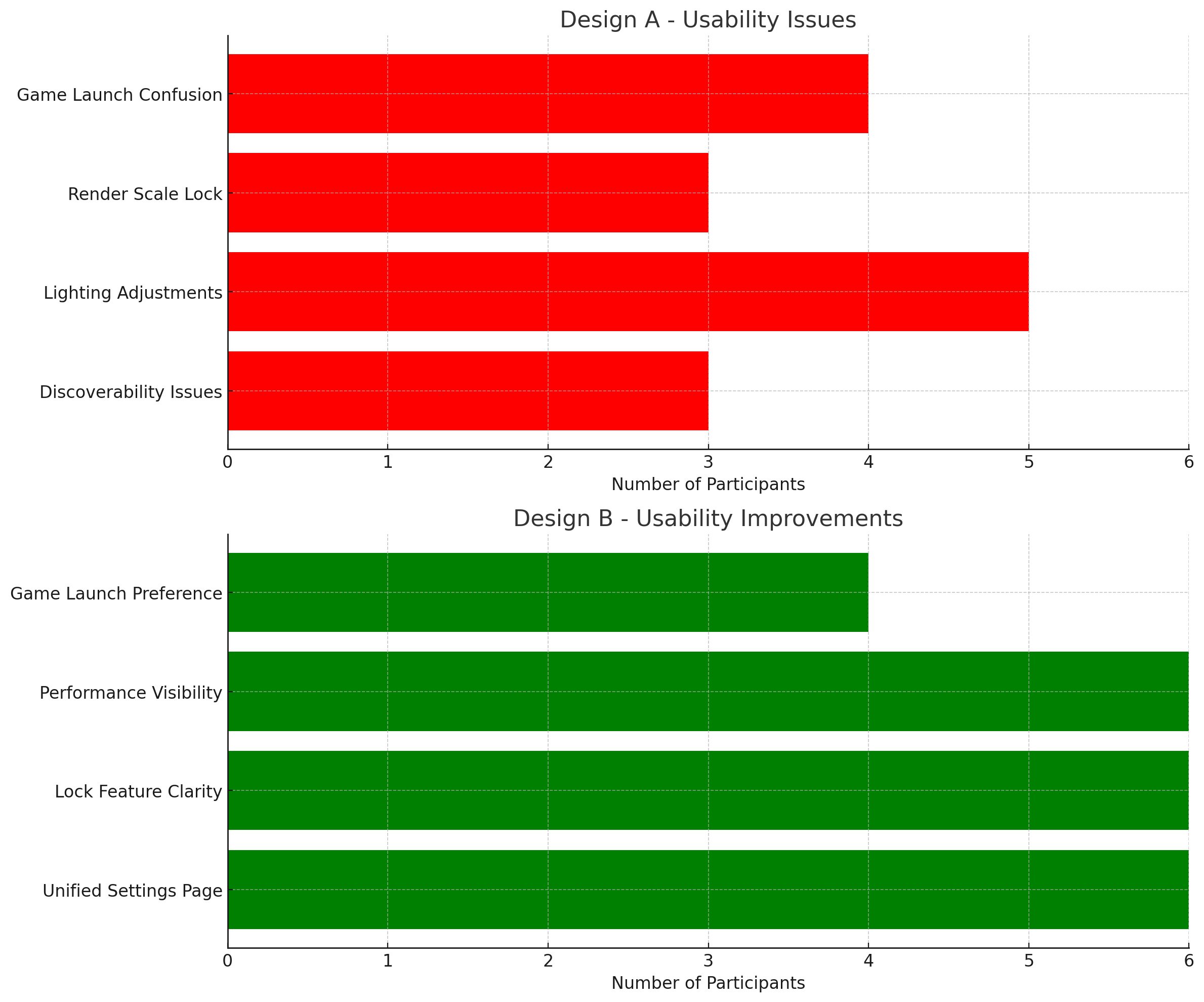

User Research :
- Conducted interviews and usability tests with 50+ gamers.
- Key personas included casual gamers who preferred automation and advanced users who wanted granular control.
Key Findings:
- Control Preferences: Users valued automation for convenience but wanted manual options for specific scenarios.
- Transparency: Gamers needed clear feedback on AI-driven changes to trust the system.
- Real-Time Feedback: Visual performance indicators were critical to demonstrate system improvements.
Second User Research & Insights
Gaming Performance Through AI-Driven Design:
- Initial Analysis: I began by analyzing existing gaming performance metrics to identify critical improvement areas. This provided a clear foundation for enhancing key performance indicators such as responsiveness, optimization, and user satisfaction.
- AI Design Principles: Based on these insights, I developed design principles tailored to gaming optimization. The focus was on using AI to streamline processes, boost in-game performance, and enhance user immersion.
- Iterative Testing: The research incorporated iterative testing phases, with user feedback and gaming outcomes central. Based on insights gathered from real-world usage and player experiences, continuous improvements were made.
- Results: The results showcased significant enhancements in the gaming experience. Players reported:
- Improved Responsiveness: Reduced latency and optimized hardware performance.
- Enhanced Immersion: AI-driven adjustments provided seamless and adaptive gameplay.
💡 UX Fixes Based on Research
- ✅ Redesigned AI insights panel to show FPS performance improvements.
- ✅ Added manual override options for greater customization.
- ✅ Grouped settings into categories for better discoverability.
💬 User Quote:
“The new UI makes it so much easier to understand what AI is doing!”
Itterations & Insights
We conducted user interviews and usability tests and analyzed interaction data to address this. Three key findings emerged:
- Lack of transparency – Users wanted to see what AI changed in real time.
- Fear of losing control – Many wanted manual overrides or a way to revert changes.
- Tooltips were overused – Users felt overwhelmed with excessive instructional pop-ups.
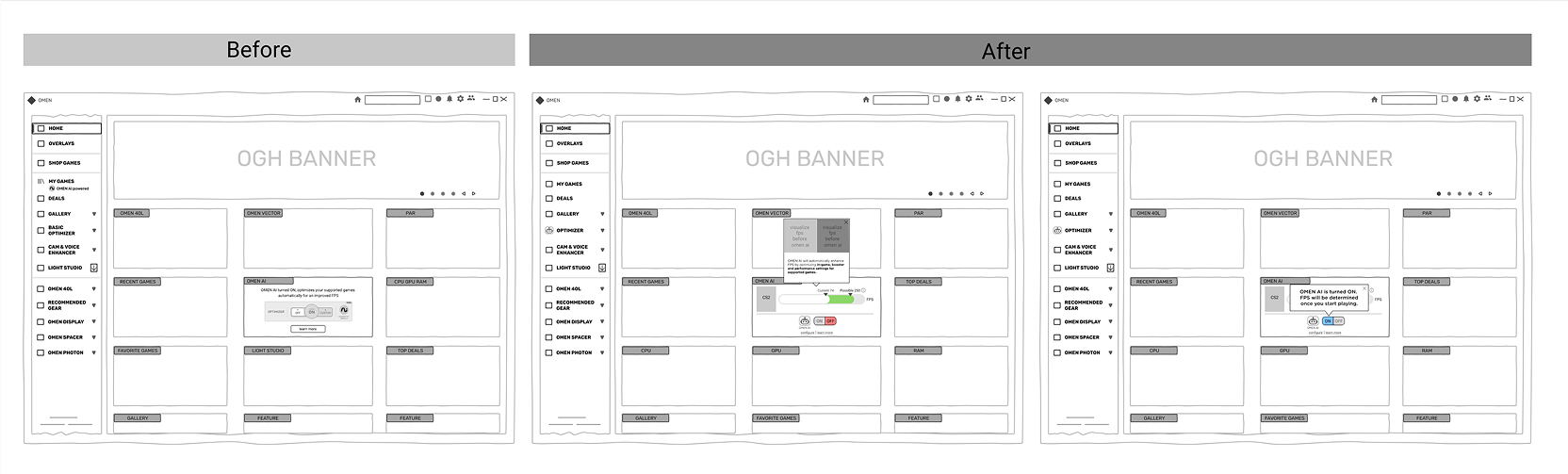

Lessons Learned
- Clear communication builds trust – Users are more likely to embrace AI when they understand its impact.
- Balance automation & control – Flexibility in settings increased engagement and retention.
- Research-driven iteration matters – The best design choices came from addressing fundamental user pain points.
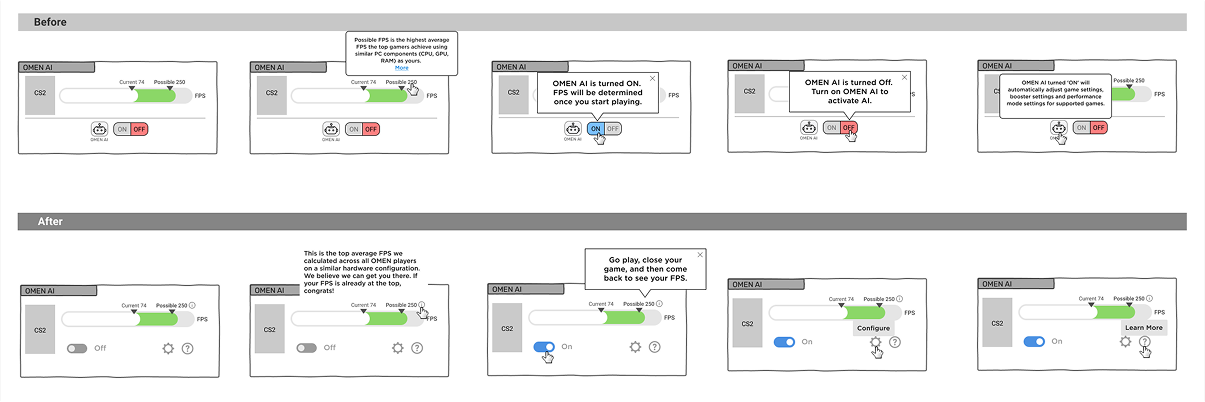
Onboarding Flow
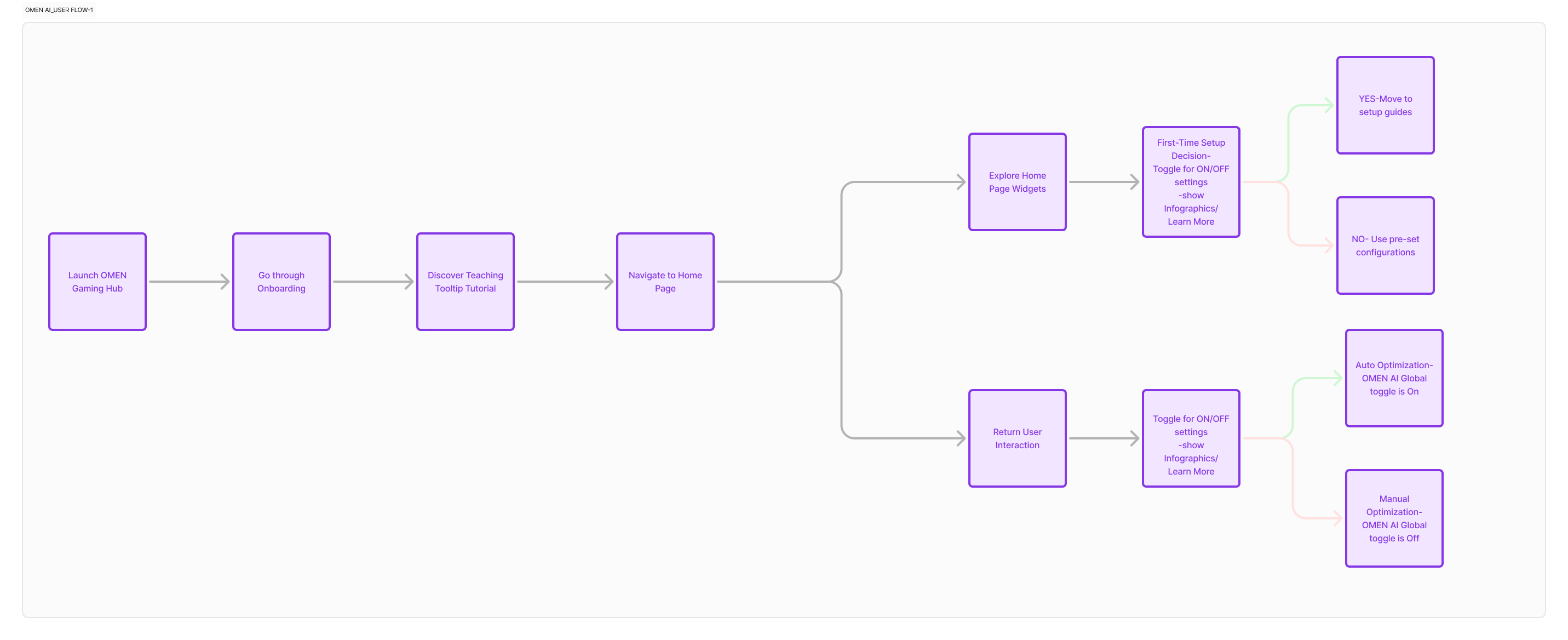
UX Challenges & Collabration
“OMEN AI was a high-stakes project with many moving parts. Balancing the expectations of multiple teams—engineering, design, and business—while ensuring a seamless user experience was a real challenge. The collaboration across teams was intense, but in the end, it led to a successful launch.” – The PM
Using our research, we identified several UX challenges and designed solutions to create a more intuitive, user-controlled experience.
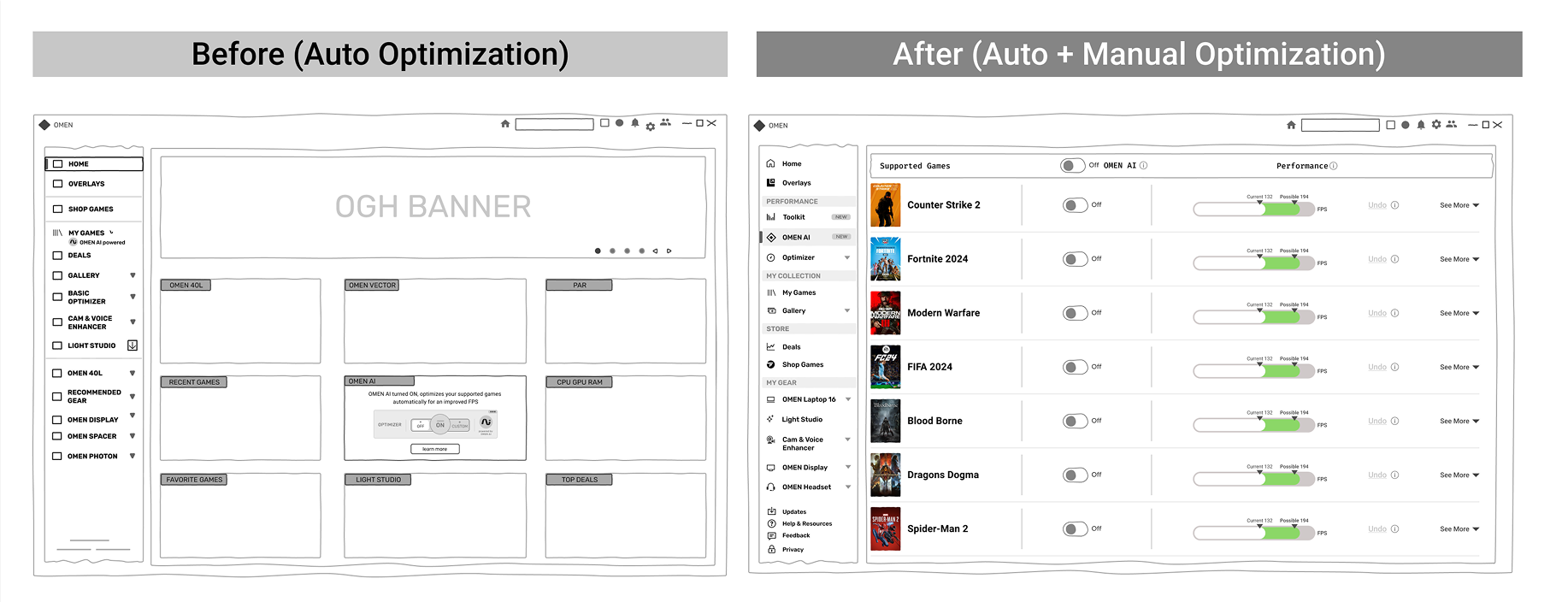
Challenge #1:
- Lack of Transparency in AI Optimizations
- Solution: Introduced Version History Panel – Users can see AI changes over time.
A step-by-step guide to familiarize users with AI and manual control features.
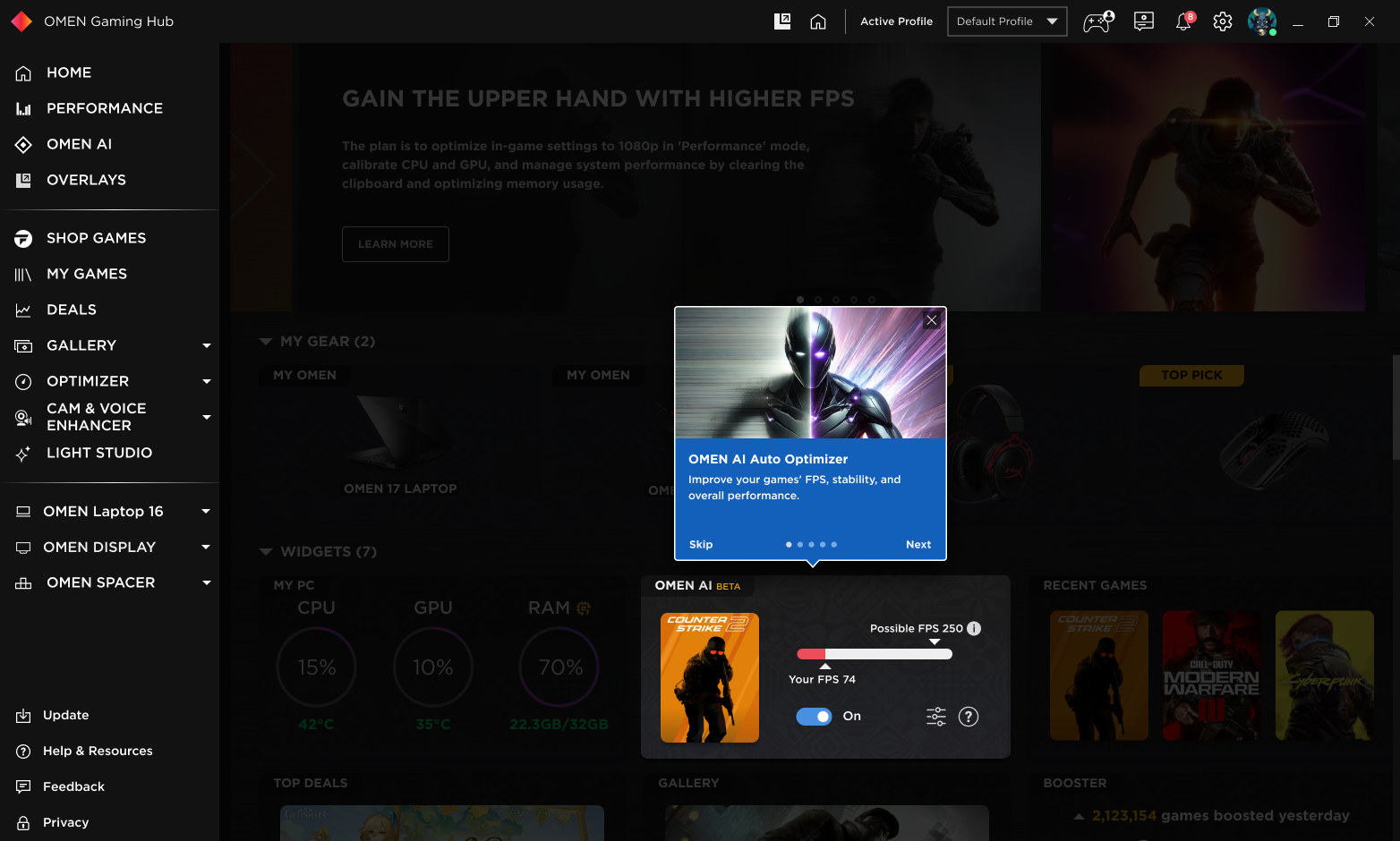
Challenge #2:
- Users Wanted More Control
- Added manual override options to fine-tune AI settings.
Challenge #3:
- Confusing Tooltips & UI Complexity
- Replaced excessive tooltips with inline visual cues & grouped settings.
🎨 Motion Design & UI Enhancements
To improve AI trust & engagement, we introduced:
🌀 AI Toggle Animation – Demonstrates dynamic FPS adjustments.
📊 Performance Graph Micro-Interaction – Shows before/after impact of AI optimizations.
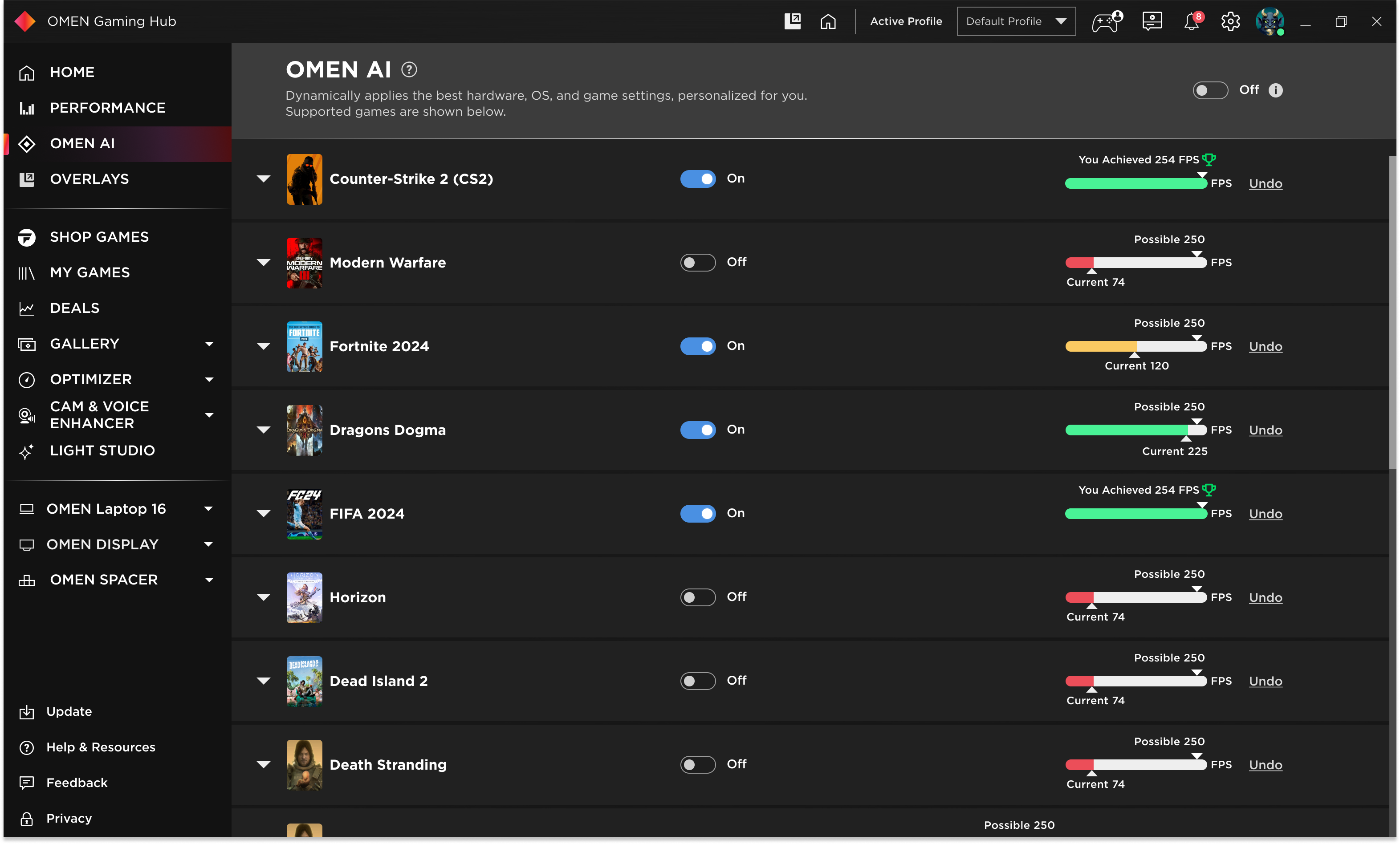
🎨 Color-Coded Indicators – Green = FPS Boost, Yellow = Manual Adjustments, Red = Low FPS.

Updated UI Components:
Visual Enhancements:
- Color-Coded Performance Indicators – Green = FPS Boost, Orange = Manual Adjustments.
- Real-Time FPS Counter – Shows instant performance improvements.
- AI Animation Feedback – Smooth transitions when adjusting settings.
Motion Design
- AI Toggle Animation – Demonstrates how FPS dynamically adjusts when AI is enabled.
- Performance Graph Micro-Interaction – Shows before/after impact of AI optimizations.
1. AI Dashboard (Automation): This central hub displays FPS, CPU/GPU usage, and system temperature.
Purpose: Demonstrate the global toggle and overall interface.
- A central hub that displays real-time performance metrics, including FPS, CPU/GPU usage, and system temperature.
- One-Click Toggle: Allows users to enable or disable AI optimization instantly.
- AI Insights Panel: Explains what optimizations are being applied and their impact on performance.
2. Manual Performance Control: Adjustable sliders for GPU/CPU allocation & fan speed.
Purpose: Provide details on manual configuration options.
- Key Features to Highlight:
- Adjustable sliders for GPU/CPU allocation and fan speed.
- A reset button to revert to AI-recommended settings.
- The profiles section shows saved configurations for different games or scenarios.
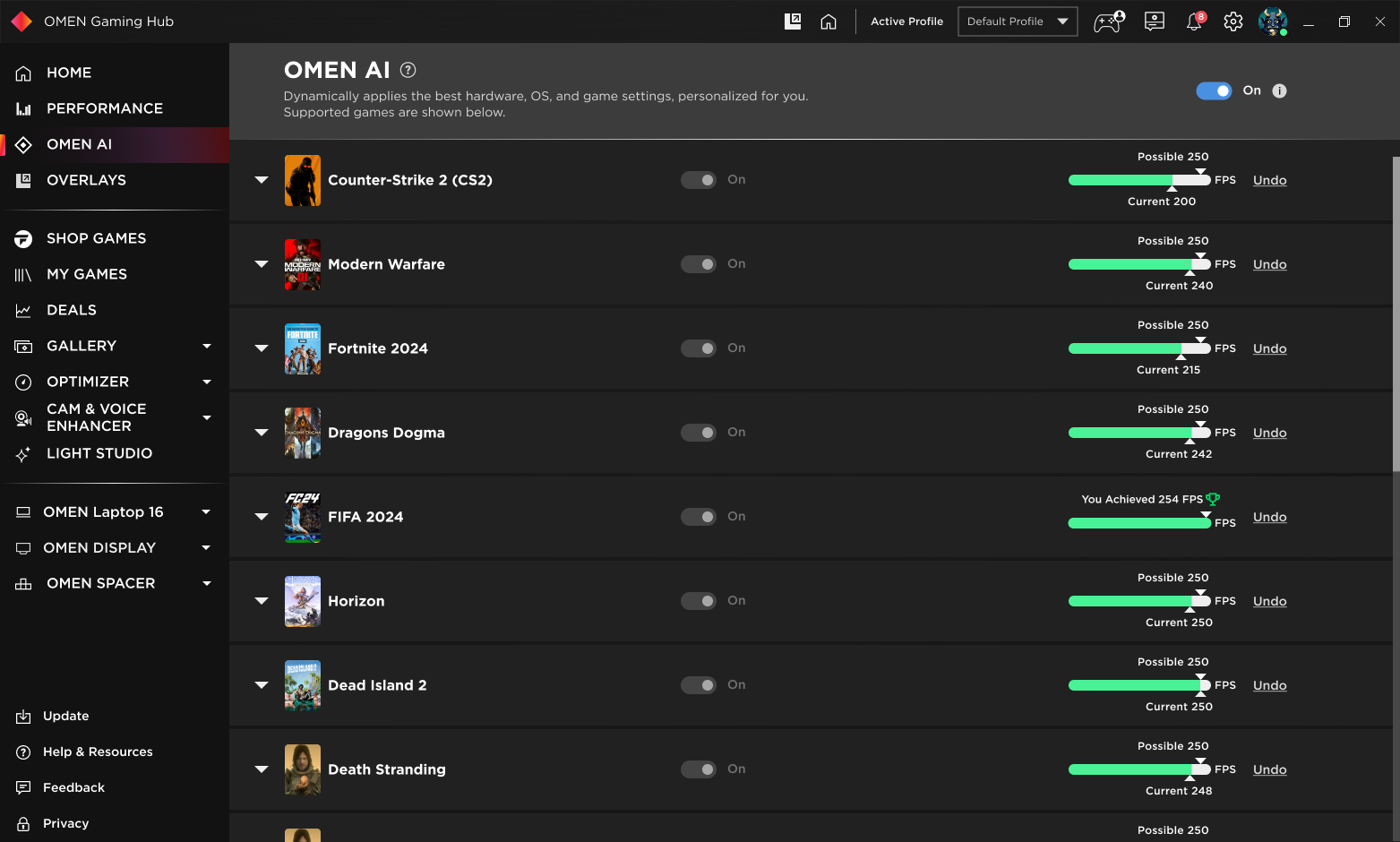

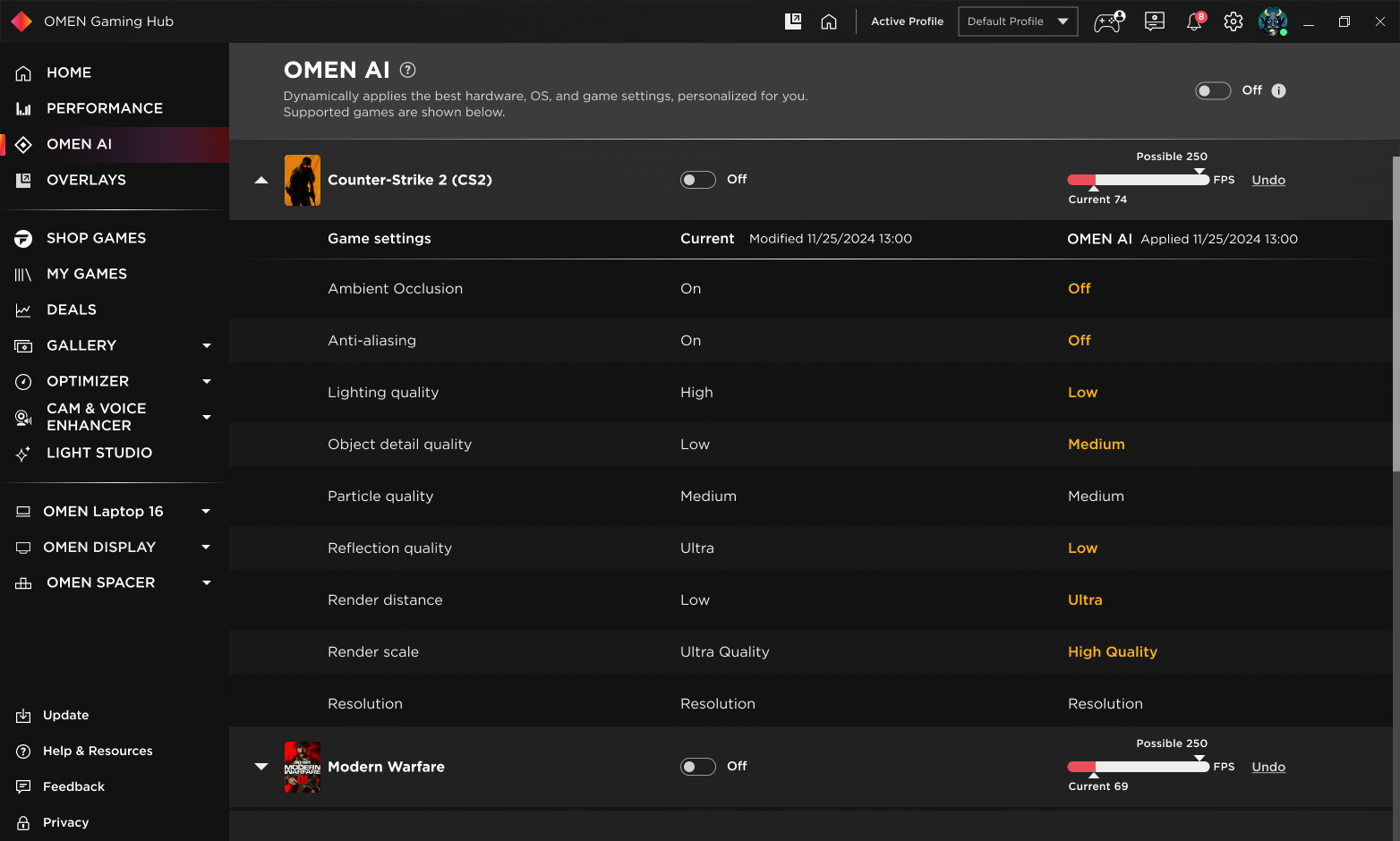
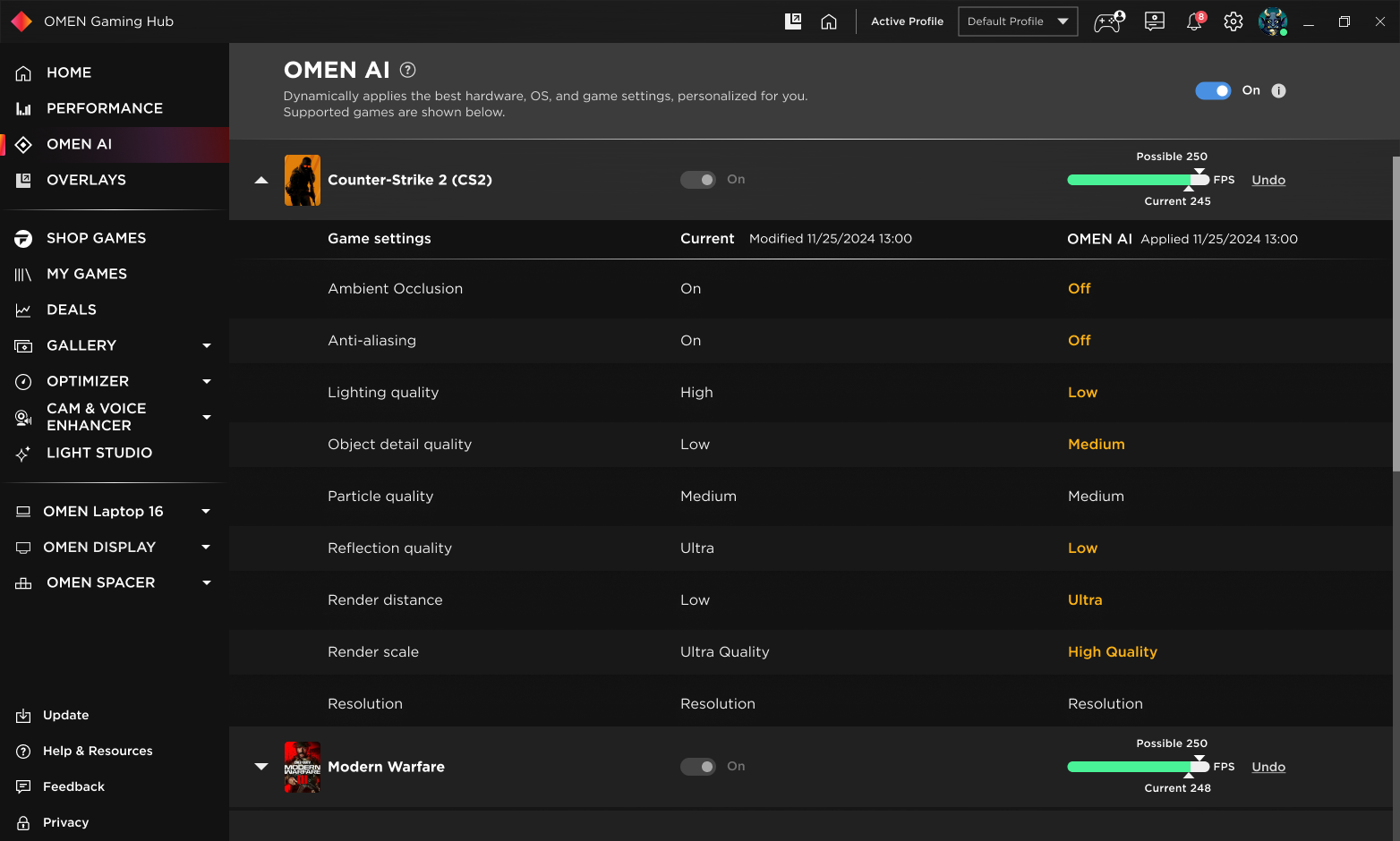

Undo Function


3. Automated vs. Manual Settings
- Purpose: Showcasing the differentiation between automated and manual control options.
- Key Features to Highlight:
- A toggle to switch between automated and manual settings.
- Contextual tooltips explaining the settings for transparency.
4. Performance Modes:
- Auto-Boost Mode (Fully Automated): Fully automated optimizations based on gameplay.
- Custom Mode (User-Controlled Settings): Combines manual adjustments with AI suggestions.
5. Onboarding Flow:
- Step-by-step UI guiding users on AI optimizations & manual control options.
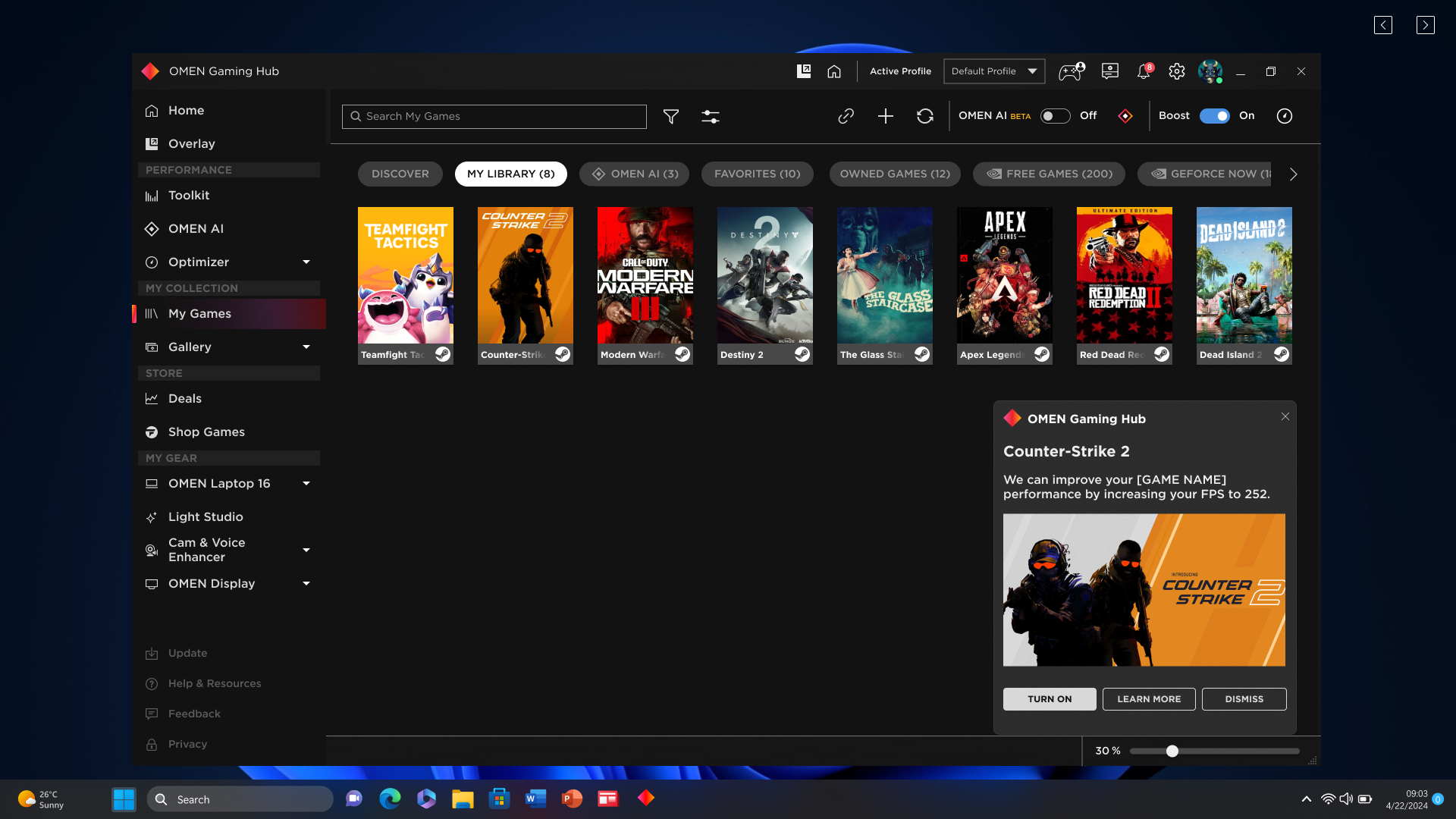
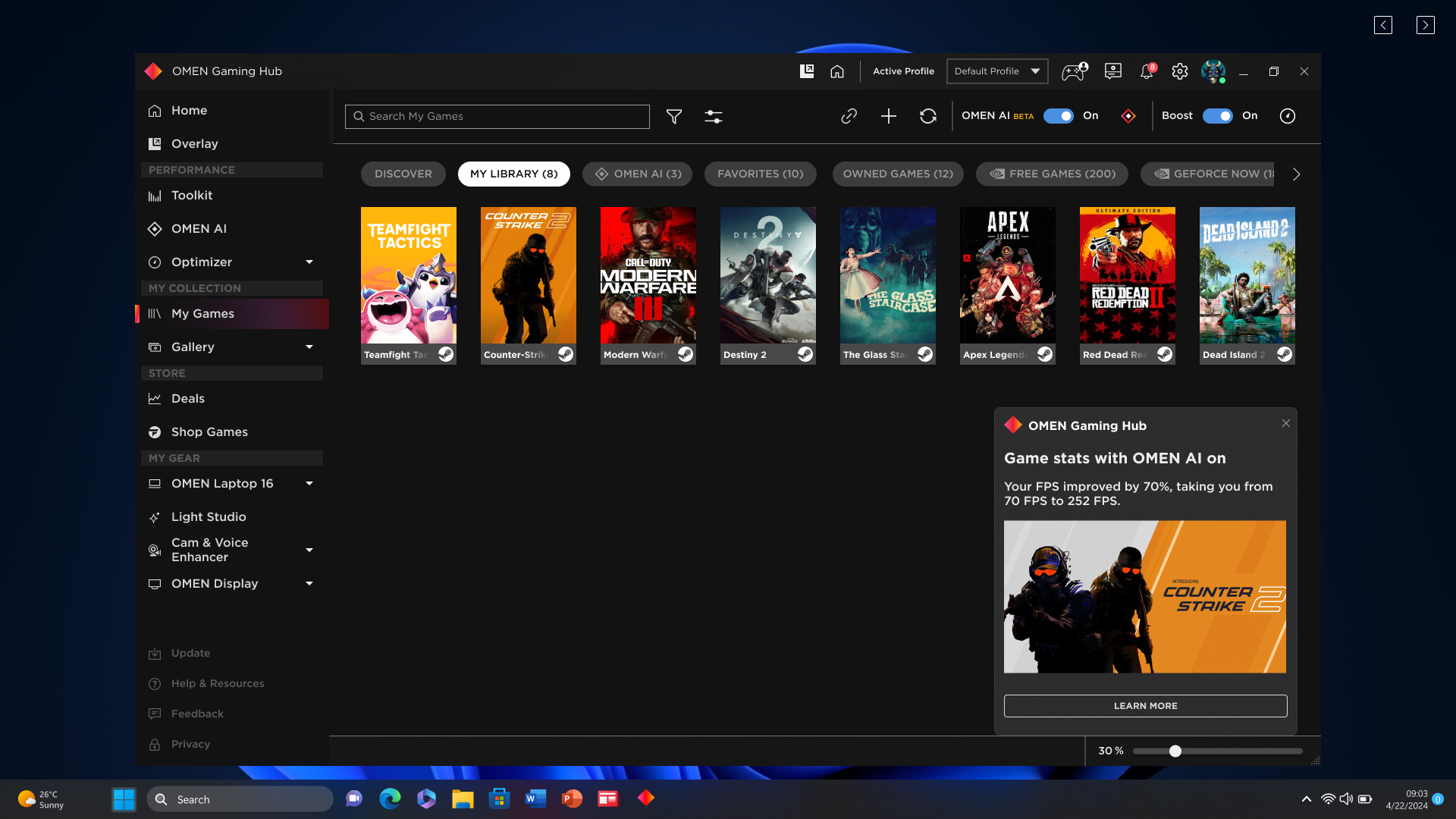
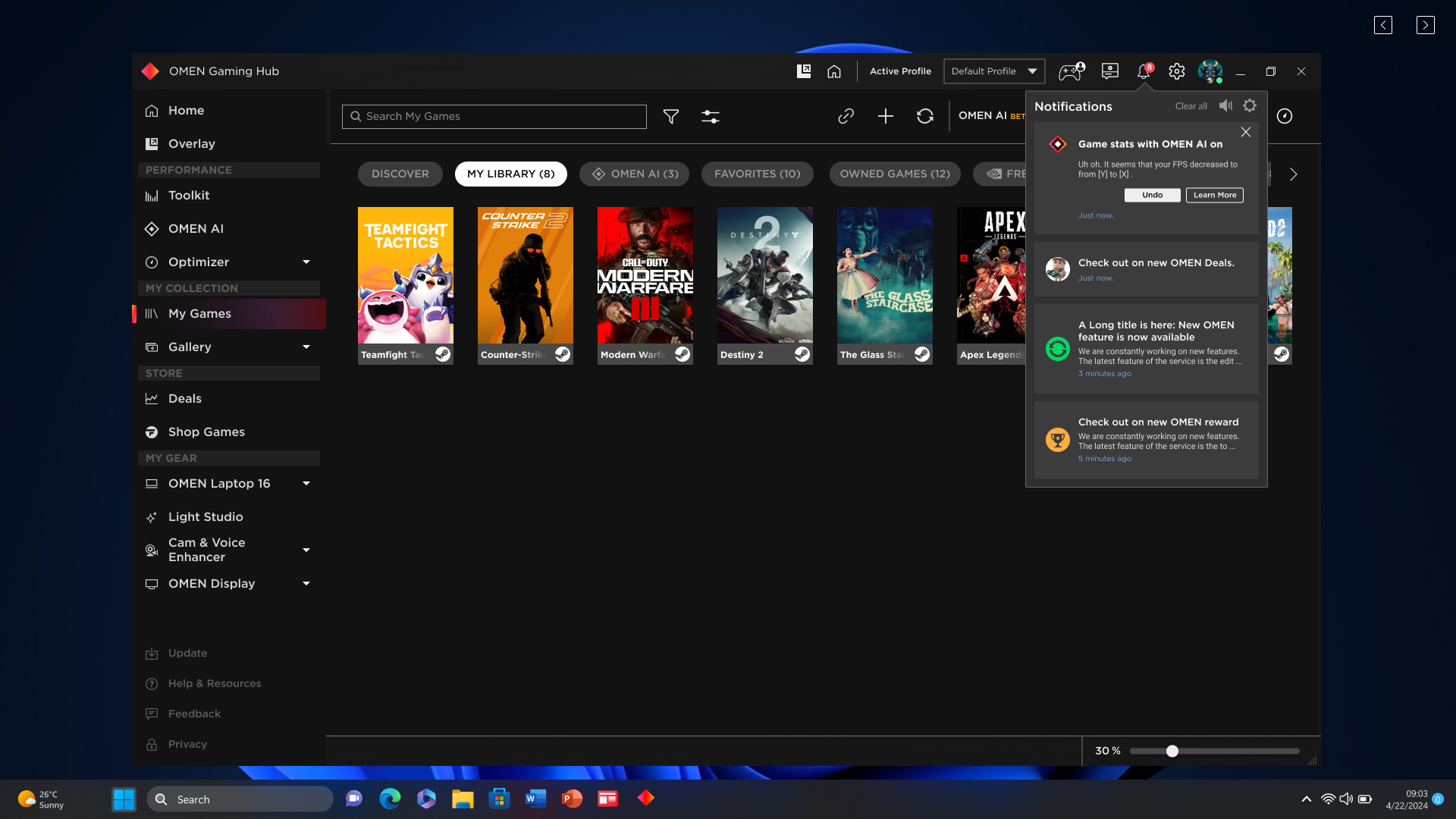
6. Real-Time Notifications
Transparent updates on performance improvements, such as FPS boosts during gameplay.
📈 Business Impact & Success Metrics
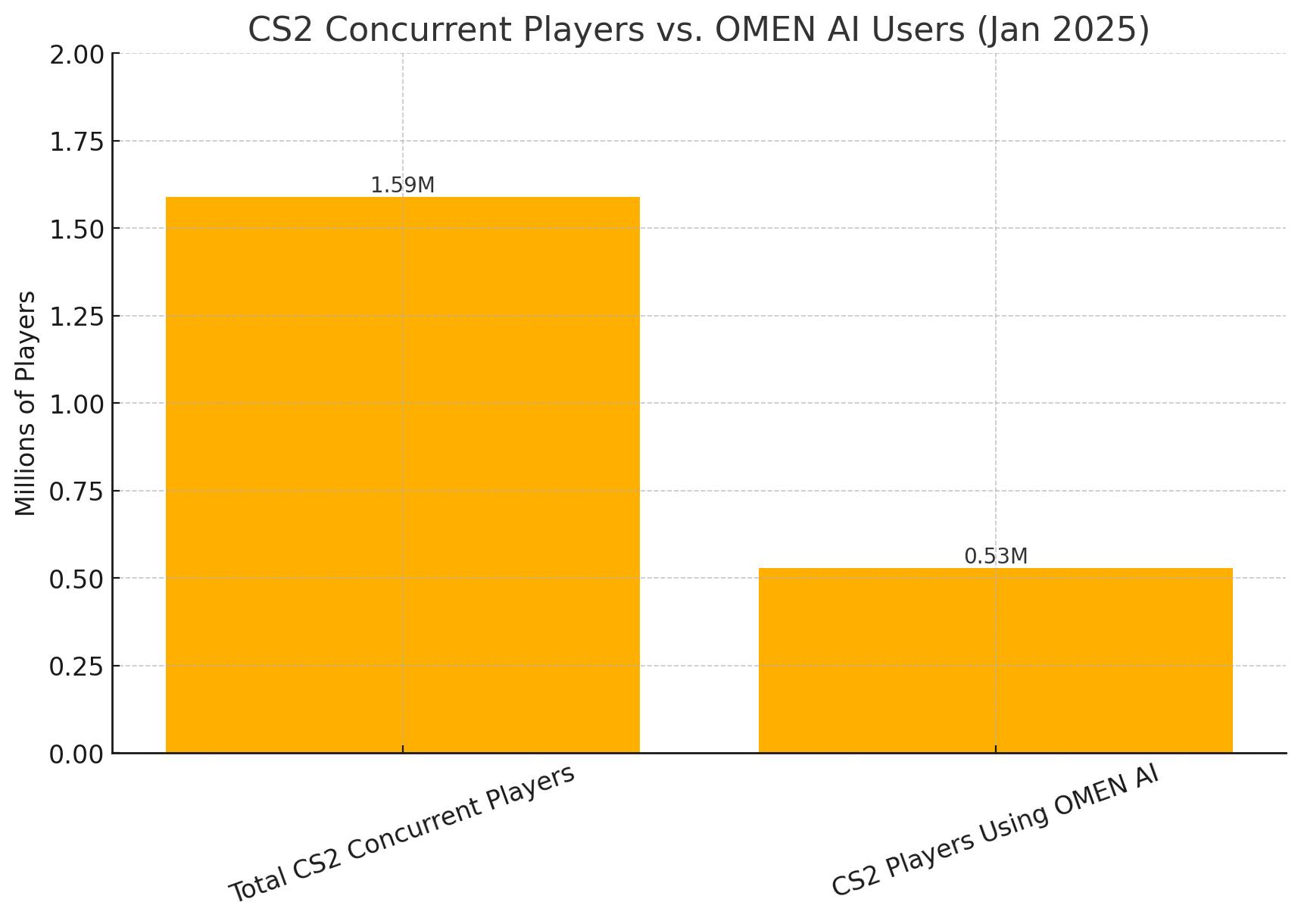
- 📊 One-third of CS2 launches use OMEN AI, showcasing its strong adoption. Approximately one-third of all Counter-Strike 2 (CS2) launches were powered by OMEN AI, solidifying its role as an essential tool for FPS gamers. With OMEN Gaming Hub’s user base of 4.3 million, this translates to millions of activations, showcasing a significant adoption rate. This high engagement underscores OMEN AI’s seamless integration into real-world gaming workflows, reinforcing its value in optimizing performance effortlessly.
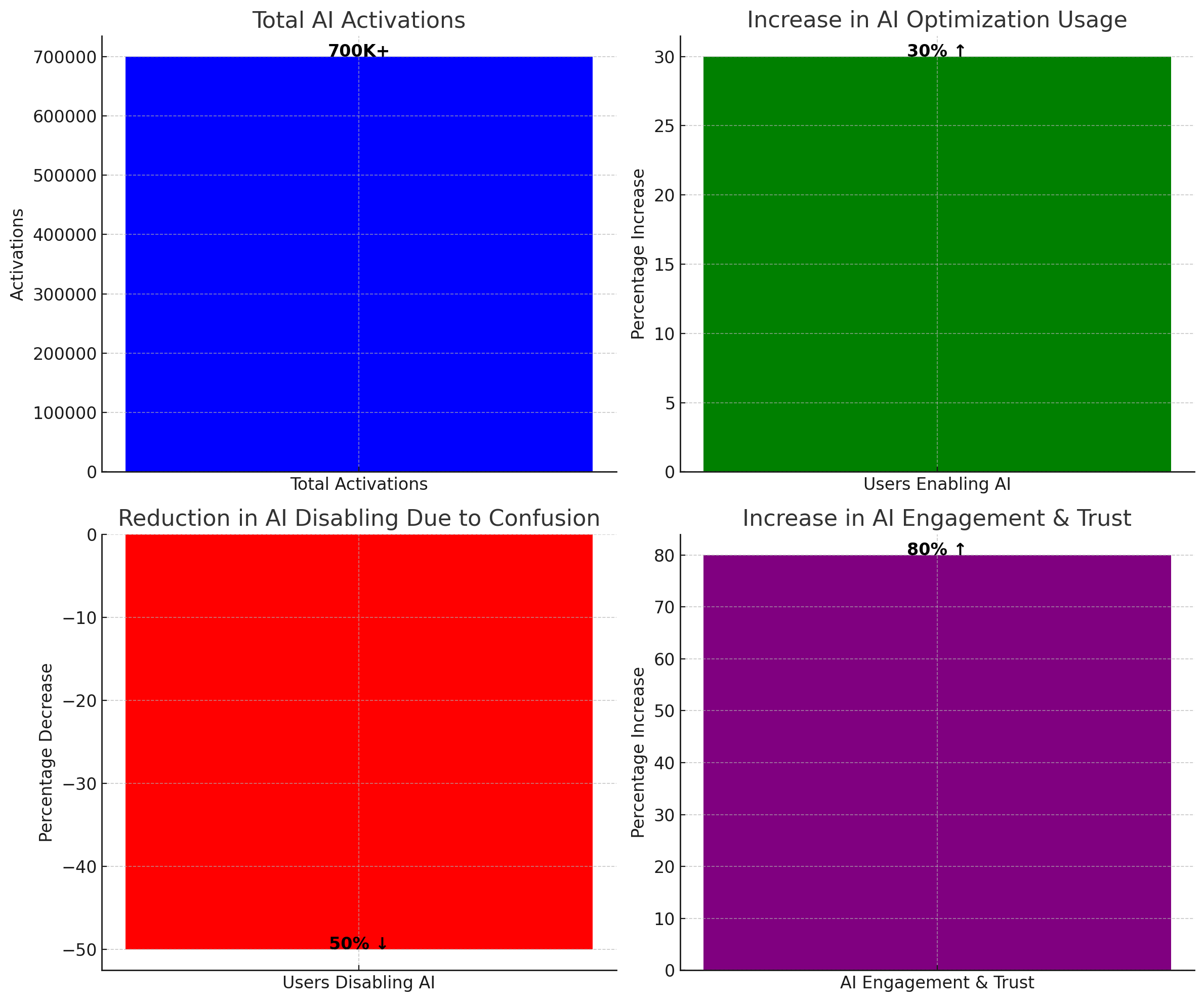
- 📊 700K+ activations (Jan-March 2025).
- 📊 30% increase in AI optimizations enabled.
- 📊 50% reduction in feature abandonment due to confusion.
💬 User Quote:
“I used to ignore OMEN optimizations, but now I trust them because I can see the changes happening in real time.”

🔮 Lessons Learned & Future Enhancements
- ✔️ Transparency is Key – Real-time AI impact builds trust.
- ✔️ User Control Remains Critical – Gamers need manual overrides.
- ✔️ Overcomplicated UI Creates Friction – Streamlining settings improved adoption.
Next Steps for OMEN AI
- 🚀 AI Version History Panel – Users can track past optimizations.
- 🚀 Personalized AI Optimizations – AI adapts based on gaming behavior.
- 🚀 Gamification Elements – Reward users for optimizing performance.
💬 User Quote:
“I love the AI improvements so far, but I’d love even more personalized settings!”
The next phase of OMEN AI includes deeper customization, allowing users to fine-tune performance settings manually.

Key AI UX Takeaways
- AI features need visible state, control, and transparency – otherwise, users will default to turning them off.
- In performance-sensitive contexts like gaming, “safe and predictable” beats “mysterious and smart”.
- Success for AI is not just “does it work technically?” but “do people keep using it and trust it over time?”
🏆 Conclusion: AI That Gamers Trust
OMEN AI has revolutionized gaming performance optimization, turning AI from a “black box” into a trusted gaming tool.
